


Inspiring
February 2, 2017
Answered

Hebrew text backwards

  • February 2, 2017
  • 2 replies
  • 8341 views

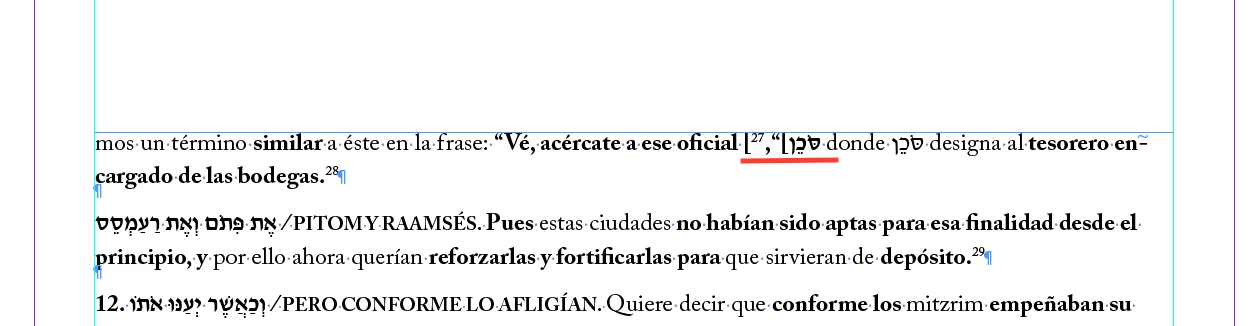
I copied a text that included Spanish and Hebrew into indesign and at first the text was fine the Spanish was LTR and the Hebrew RTL but then I added a script to make footnotes into two columns something changed and now when I have Hebrew words in brackets the text is weird and I can't pinpoint what changed

Before

After
This topic has been closed for replies.
Correct answer Dov Isaacs

Great!

In certain situations where you have certain characters (including numerals, parentheses, etc.) that are used either in a Left-to-Right or Right-to-Left context adjoining Hebrew text, you need to explicitly define such text as Left-to-Right to counteract assumptions (often wrong) made by InDesign.

If you have the Text tool selected, on the task bar at the far right hand corner is a “hamburger menu” that if you pull down, you will see Text Direction options of Left-to-Right and Right-to-Left. Use that to override the problematic text and voila, your problem should be solved.

Please confirm that this fixes the issue for you.

          - Dov

2 replies

Participant
November 18, 2020

i havve he same problem wiht a site <<link deleted by moderator>>

so instead of getting "אברהם"  i get "םהברא"

any ideas?


Participant
November 18, 2020

i also just noticed - that the headers remain the same dieciton - just the text switches the order. can that be a clue?

Dov Isaacs
Legend
February 2, 2017

What version and locality of InDesign do you have installed? Unless you have the English/Hebrew version installed, this type of problem is not readily resolved.

          - Dov

- Dov Isaacs, former Adobe Principal Scientist (April 30, 1990 - May 30, 2021)
Inspiring
February 2, 2017

I have the English/Hebrew version

Dov Isaacs
Dov IsaacsCorrect answer
Legend
February 2, 2017

Great!

In certain situations where you have certain characters (including numerals, parentheses, etc.) that are used either in a Left-to-Right or Right-to-Left context adjoining Hebrew text, you need to explicitly define such text as Left-to-Right to counteract assumptions (often wrong) made by InDesign.

If you have the Text tool selected, on the task bar at the far right hand corner is a “hamburger menu” that if you pull down, you will see Text Direction options of Left-to-Right and Right-to-Left. Use that to override the problematic text and voila, your problem should be solved.

Please confirm that this fixes the issue for you.

          - Dov

- Dov Isaacs, former Adobe Principal Scientist (April 30, 1990 - May 30, 2021)
