Participant
July 29, 2021
Question

Help! Diagonal Text Wrapping

  • July 29, 2021
  • 2 replies
  • 1107 views

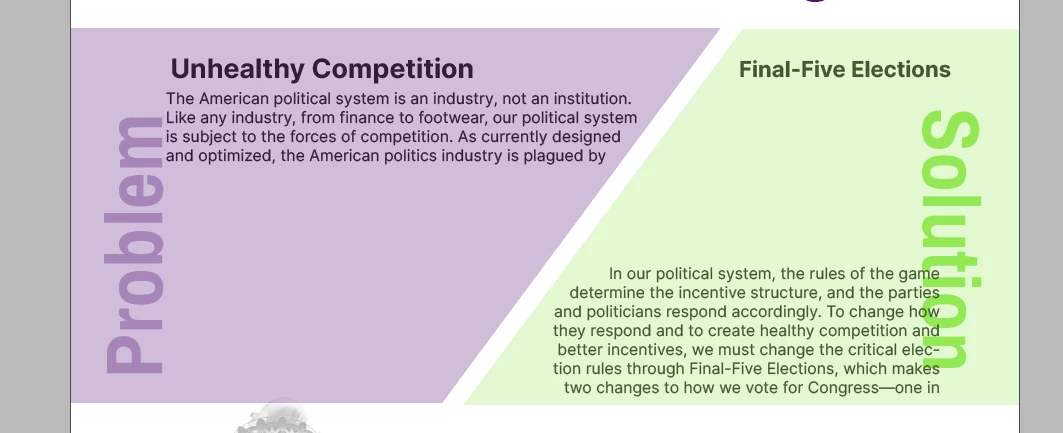
Hi, I'm trying to create two, side-by-side sections in InDesign 2021 with a diagonal divider but my text wraps keep interfering with one another. The green shape's text wrap is applying to both the text I want over the green shape AND the text I want over the purple shape. How do I make the text wrap only apply to one text box at a time? I've tried messing with "ignore text wrap," contour options, grouping, moving to different layers. Any suggestions?
This topic has been closed for replies.

2 replies

Legend
July 29, 2021

You can select one corner of each text box with the Direct Selection tool, and slide it over with the shift key held to keep the bottom of the box straight. Then you will not need text warp.


Community Expert
July 29, 2021

Well that's what I was saying to make triangular text frames - or am I missing something?

Community Expert
July 29, 2021

I'm not sure I follow what the actual problem is here.

Why do you need Text Wrap here?


Can you please elaborate?


I'd just put the text in a triangular text frame. Then you won't need text wrap.