April 11, 2011
Question

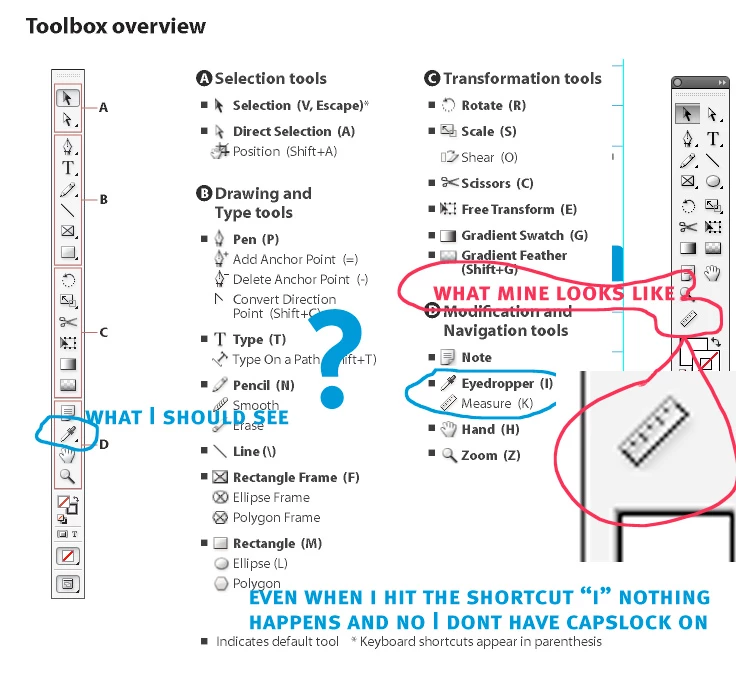
Help - my eyedropper tool is missing -not within "measure tool" dropdown

  • April 11, 2011
  • 6 replies
  • 23225 views

My eyedropper tool is nowhere to be found (not within the measure tool's dropdown).

There must be a preference holding me back here but I cant find it.
    This topic has been closed for replies.

    6 replies

    April 19, 2011

    I went on an associates computer of whom we installed the same version. He had the plugin so I just grabbed it from him. But thanks to all anyhow. Weird that iy just dissappeared. I sureley wouldnt delete something like that. weird.

    April 19, 2011

    Completley reinstall InDesign for one plugin?! Honestly I don't have time for that. There has got to be a better way. Can you email it to me? Is that legal?

    Peter Spier
    Community Expert
    Community Expert
    April 19, 2011

    If you have the disks, you should be able to run a "Repair" from the installer.

    April 19, 2011

    Any idea why its not on mine? or where to get it?

    Larry G. Schneider
    Community Expert
    Community Expert
    April 19, 2011

    Probably easiest to reinstall. Use the Uninstaller first and then a custom reinstall of CS4 choosing InDesign only.

    April 11, 2011

    Do I need to donwload it somewhere or did it come with my CS4?

    Peter Spier
    Community Expert
    Community Expert
    April 11, 2011

    Help > Configure Plugins and make sure the Eydropper Tool plugin has a check mark next to it to inidcate it's enabled. If it does, see my previous post.

    April 19, 2011

    I guess I didnt have the plugin so I downloaded the trial version from Flux. (BTW Am I missing something? Was this a free plugin that came with InDesign on some packages?)

    So I replaced my preferences. then I loaded the 60 day full functional trial as directed and retsarted InDesign. Then I configured the plugins. The plugin appears there visible but without the adobe logo. I am not sure waht this means. ...- and still wont appear in the toolbar.

    macinbytes
    Inspiring
    April 11, 2011

    Sometimes extensions don't load and a simple quit and relaunch is in order. You could check your extension manager to see if it is being called to be loaded. Disabling, relaunching InDesign, and enabling again may cure what ails you.

    Looks just like the extension didn't load. It's an optional extension. That's standard toolbar look when the extension isn't enabled.

    Peter Spier
    Community Expert
    Community Expert
    April 11, 2011
