
Participating Frequently
September 14, 2022
Answered

Help scrolling through fonts - doesn't work.

  • September 14, 2022
  • 3 replies
  • 439 views

I am new to InDesign.


I am using a PC and have doen the usual (updated app, resarted computer, reset defaults).


With text selected I have tried to search for a font name - no fonts appear. If I use Type>Font (I can see A - C fonts and those I have used recently) I cannot scroll down to see past 'Centaur' font.


Any ideas?

Thanks
This topic has been closed for replies.
Correct answer Barb Binder

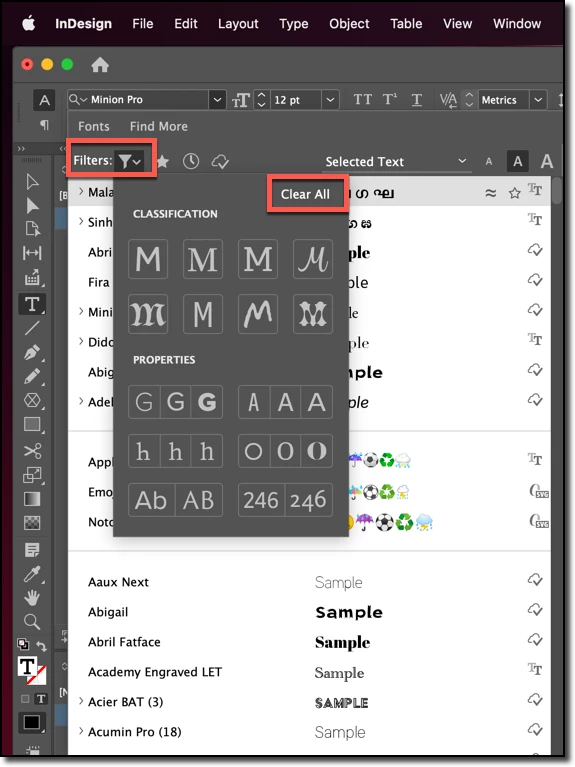
I'm guessing you have font filters activated. Try clicking the Clear All button. Are the fonts visible again? If not, try clicking the star icon to the right of the Filters menu on/off, and then the rest of the buttons on that top row.


~Barb


3 replies

Barb Binder
Community Expert
Community Expert
September 14, 2022

And how did I know the answer? Been there, done that! 😊


~Barb

~Barb at Rocky Mountain Training
Participating Frequently
September 14, 2022

Barb,


It was the star button. Thank you, it has been a problem for days.


Rupert


Barb Binder
Community Expert
Barb BinderCommunity ExpertCorrect answer
Community Expert
September 14, 2022

I'm guessing you have font filters activated. Try clicking the Clear All button. Are the fonts visible again? If not, try clicking the star icon to the right of the Filters menu on/off, and then the rest of the buttons on that top row.


~Barb


~Barb at Rocky Mountain Training