
Inspiring
September 5, 2025
Question

HELP: Startup script does not recognize .JSX file

  • September 5, 2025
  • 1 reply
  • 449 views

I have a simple start up script which reads "afterNew" perform a .JSX script which is located in the scripts panel

tell application "Adobe InDesign 2025"
	set myEventNames to {"afterNew"}
	repeat with myEventName in myEventNames
		make event listener with properties {event type:myEventName, handler:"Macintosh HD:Applications:Adobe InDesign 2025:Scripts:Scripts Panel:daffy.jsx"}
	end repeat
end tell

but i get an error?? the path is correct 
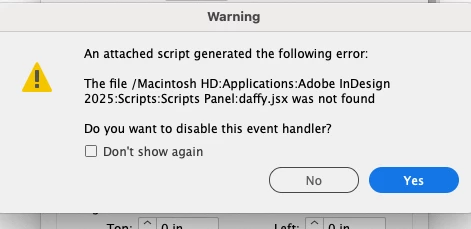


not sure why the script isnr seeing the JSX file. has the scripting functionality changed?? i have used similar start up scripts in the past with out issue.


maybe there is a better way to write the event script so that it performs the .JSX without "pointing" it to nested scripts folder?? 


daffy.JSX sets the "Measurement Units" to "Inches".

var d = app.documents
for (var i = 0; i < d.length; i++){
    d[i].viewPreferences.horizontalMeasurementUnits = MeasurementUnits.INCHES;
    d[i].viewPreferences.verticalMeasurementUnits = MeasurementUnits.INCHES;
};   
app.viewPreferences.horizontalMeasurementUnits = MeasurementUnits.INCHES;
app.viewPreferences.verticalMeasurementUnits = MeasurementUnits.INCHES;

1 reply

Community Expert
September 5, 2025

2025 version moved away from HFS paths. So you may need to change the path to jsx into a Posix path and it shall work. See https://helpx.adobe.com/uk/indesign/kb/user-dictionaries-missing-hfs-path-dropped.html

Also, why do you use Applescript calling up JSX. Why not do all stuff in the JSX?

-Manan

-Manan
Inspiring
September 5, 2025

"Also, why do you use Applescript calling up JSX. Why not do all stuff in the JSX?"


because its been many many years since I created ANY scripts lol


my guess is that instead of calling out the .JSX script with the startup script it could be written as a single start up script. BUT I dont know how.


The scripts were created to handle and issue of new files being created with the Measurement Unit set to pixels. Without getting into too much detail, our Indesign is set to receive documents from a front end system. Those documents are always set to Measurement Unit: Pixels. New docs are generated automatically. The idea is (afterNew) to set units from pixels or whatever to inches. The easy answer is to correct the front end system but its not only a defualt issue but user error. and its proprietary software etc etc.