
Participant
April 24, 2017
Answered

Help with Colour settings in Indesign (post blurb plugin)

  • April 24, 2017
  • 1 reply
  • 2050 views

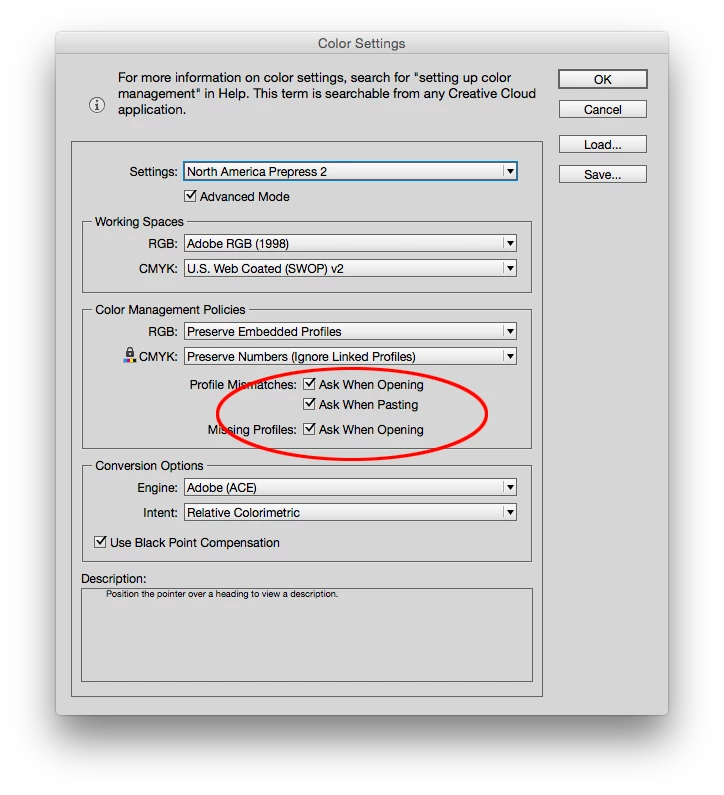
Hi, I've just sent a book off to Blurb to be printed via the indesign plugin, however, whenever I open up any file in Indesign, for previous files and not for the plugin, I have this pop up?

Would anyone be able to explain what it is / what are the most suitable settings to have? I know the difference between CYMK and RGB but that's about it (my next project is my final major which will eventually be printed too).

Thank you for any help

A confused student.
This topic has been closed for replies.
Correct answer rob day

Your Color Settings preferences (usually) only affect a new document's settings and do not apply to existing documents—so syncing your Color Settings wouldn't solve color management problems for existing documents.

The Profile Mismatch check boxes throw up a dialog to let you know that the opening document's assigned profiles and color management policies don't happen to match your current Color Settings. The warning dialog lets you change the existing document's profiles and policies. If you don't want to get the warning uncheck all.

1 reply

rob day
Community Expert
rob dayCommunity ExpertCorrect answer
Community Expert
April 24, 2017

Your Color Settings preferences (usually) only affect a new document's settings and do not apply to existing documents—so syncing your Color Settings wouldn't solve color management problems for existing documents.

The Profile Mismatch check boxes throw up a dialog to let you know that the opening document's assigned profiles and color management policies don't happen to match your current Color Settings. The warning dialog lets you change the existing document's profiles and policies. If you don't want to get the warning uncheck all.

Participant
April 24, 2017

Thank you - which colour settings should it be for the UK?

As I've never had these prompts before.

rob day
Community Expert
Community Expert
April 24, 2017

As I've never had these prompts before.

I assume Blurb provides a Color Settings setup with the Ask When ... boxes checked? If you don't want the warning uncheck the boxes.

If you are working on a new project that isn't going to Blurb you could switch to one of the default European presets which use Coated Fogra 39 as the CMYK profile before you create the document. There isn't a huge difference between SWOP and Fogra.

The assigned CMYK profile only affects the appearance of CMYK images and native CMYK colors and swatches, and assigned RGB profile only affects the appearance of RGB objects. So the current conventional wisdom is to keep all of your placed images as RGB and then you can choose the appropriate CMYK profile for the conversion to CMYK when you export the final PDF.