
Inspiring
February 27, 2024
Question

Help with Data Merge

  • February 27, 2024
  • 1 reply
  • 220 views

I am trying to use data merge to fill out a template.


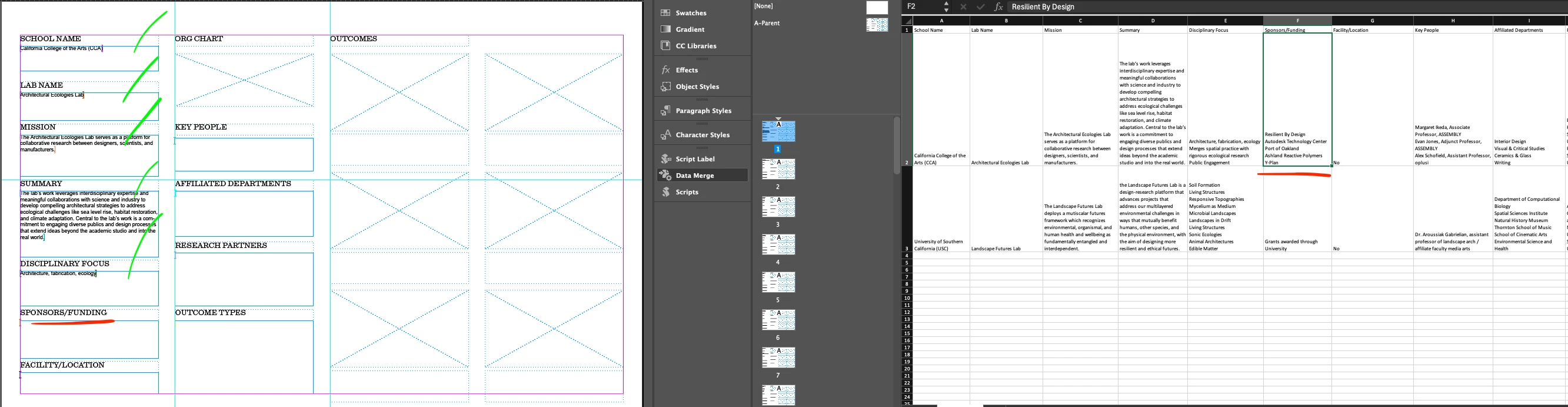
Firstly, I have tried the below steps placing the label placeholders in both the parent page and a child page. The result is similar.


As you can see, all labels through Disciplinary Focus populate correctly for the first record. however, once we reach the next cell of the spreadsheet, the transcription errors begin. I am wondering if it is related to the line breaks (shift-enter) in the Excel cell that I am using to create a "list." But it mostly gets thrown off with no clear pattern and creates 42 pages for only 2 records.
This topic has been closed for replies.

1 reply

Inspiring
February 27, 2024

Hi,


I think the issue is definitely related to having paragraph breaks in the cells.


Can anyone please suggest a strategy to data merge or otherwise import contents of a cell formatted like this?


Thank you!

Charlie

Community Expert
February 27, 2024

The workaround is to replace the paragraph break with a unique string in the data source. You can use any string, something like  /r/r. Then once the data is merged in Indesign, find the /r/r and replace with an actual return ^p.

Inspiring
February 27, 2024

Great, this is enough to get me moving again, thank you!