Participating Frequently
November 28, 2022
Answered

HELP WITH FOOTNOTES

  • November 28, 2022
  • 3 replies
  • 873 views

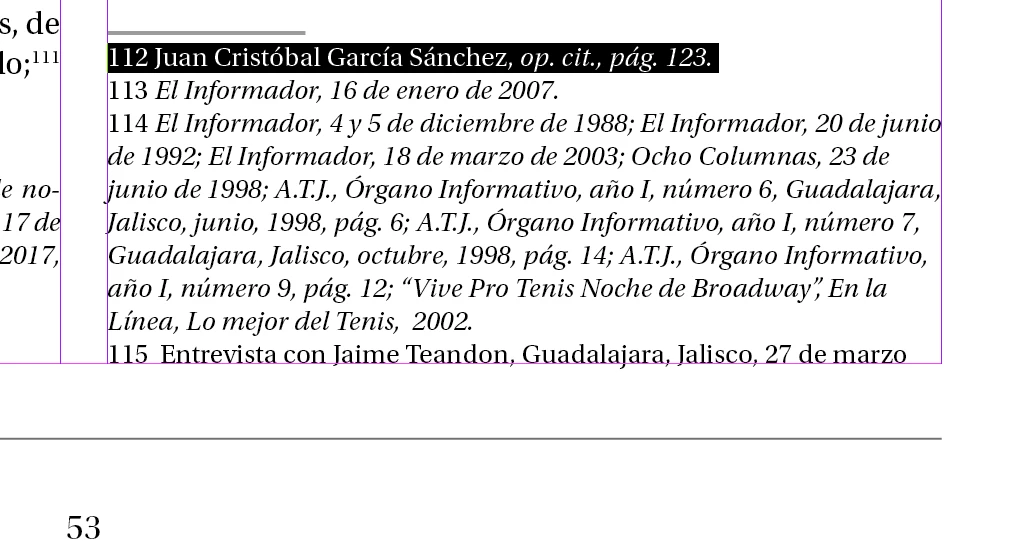
Hi there one question, I have a Character style assigned for the footnotes, but when I try to select the whole "paragraph"of this text placed from word it's just selected line by line as if they were separated, how can put the style I want without having to select line by line? Best Regards.

This topic has been closed for replies.
Correct answer James Gifford—NitroPress

You don't use a Character Style for this; you use a Paragraph Style. Which in this case would be named 'footnote' or 'Footnote' and be applied to all of the actual footnotes in the document. Changes to the Footnote style will then be applied to all paragraphs tagged Footnote.


Just in case that's not (quite) the issue, you can't select multiple footnotes at a time. Each is in a layout 'bubble' of its own. The only way to manage the styles is to make sure footnotes are assigned that consistent paragraph style, and adjust that style.


This is a very basic layout, design and InDesign concept, and if you don't grasp Paragraph Styles you may wish to work though a few basic tutorials on how to use the fundamentals of ID's layout features.
 

3 replies

Barb Binder
Community Expert
Community Expert
December 2, 2022

Hi @PREPRENSA5CC5:


Your footnotes are snapped to the baseline grid. The easiest solution is to take them off the grid by editing the Footnote style. (See image below.)  Or you can tell us your baseline grid value, the footnote leading value and the three footnote spacing values (found in Type > Document Footnote Options > Layout) and we can work out the correct math for you so that each note on is on the next baseline, and not skipping a baseline. 


~Barb


Taking them off the grid:


~Barb at Rocky Mountain Training
Barb Binder
Community Expert
Community Expert
November 29, 2022

Hi @PREPRENSA5CC5:


I would use Type > Document Footnote Options to set up your footnotes. You can create the Footnote style there and InDesign will assign it to all the footnotes for you. (I just changed the size and color to show you the concept.)


You can also adjust the layout there, including adding space above the footnote rule. 


~Barb


~Barb at Rocky Mountain Training
Participating Frequently
December 2, 2022

Thank you! but, how do I get those lines of the footnotes together, because now theyr'e separated and i cant reduce the spacce between the lines? 

James Gifford—NitroPress
Legend
December 2, 2022

These are not endnotes, but footnotes. Use the Footnote Options panel to adjust all characteristics of these, including the line-above.


(Sorry, that comment was a confusion of threads.) As Barb notes, you control all aspects of how footnotes appear on the page through the Footnote Setup pane and the style applied to the footnotes.


James Gifford—NitroPress
Legend
November 28, 2022

You don't use a Character Style for this; you use a Paragraph Style. Which in this case would be named 'footnote' or 'Footnote' and be applied to all of the actual footnotes in the document. Changes to the Footnote style will then be applied to all paragraphs tagged Footnote.


Just in case that's not (quite) the issue, you can't select multiple footnotes at a time. Each is in a layout 'bubble' of its own. The only way to manage the styles is to make sure footnotes are assigned that consistent paragraph style, and adjust that style.


This is a very basic layout, design and InDesign concept, and if you don't grasp Paragraph Styles you may wish to work though a few basic tutorials on how to use the fundamentals of ID's layout features.