June 19, 2019
Question

Help with GREP Style

  • June 19, 2019
  • 2 replies
  • 291 views

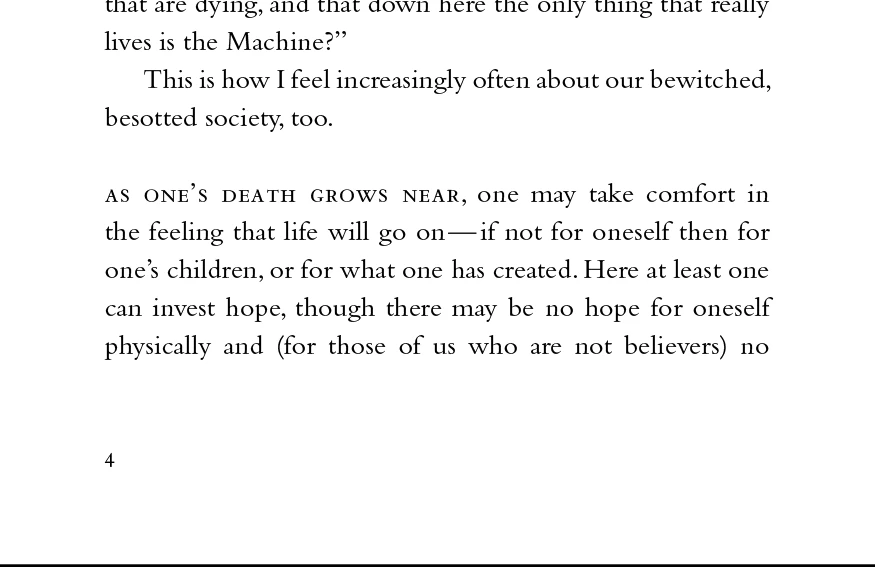
Perhaps one of you InDesign geniuses could help me with this.  How would I program a GREP style which automatically makes the first five words of a paragraph to be small caps?  If it was also possible to force the first letter to be lowercase, that would be especially helpful.  You can see the intended styling (which we want to use for section breaks in our books) in the image below.  With this solution, I would then be able to have a "section break" Paragraph Style which handles all the necessary formatting, which would be excellent.

Thanks!

Warmly,

Jonathan
    This topic has been closed for replies.

    2 replies

    Community Expert
    June 19, 2019

    Or you can do this with a nested style that applies a character style through 5 words.

    Jongware
    Community Expert
    Community Expert
    June 19, 2019

    ^(\S+\s+){5}

    does the trick -- a series of 5 not-whitespace characters followed by one or more spaces.

    Making them lowercase is not possible, GREP styles don't do that and there is no "to lowercase" formatting. But check your font, it might have an OpenType All Caps To Small Caps feature.

    June 19, 2019

    Hi Jongware,

    Your GREP Style is perfect.  I can't thank you enough!  But where in the OpenType menus might I find this All Caps to Small Caps feature.  That's something I've been looking for with other things as well.  Here is what I'm seeing:

    Thanks!

    Warmly,

    Jonathan

    June 19, 2019

    P.S. I just found it!  This particular font does have All Caps to Small Caps.  That's perfect!  Thanks again.

    Warmly,

    Jonathan