rajeshp42310841
Participant
May 25, 2019
Answered

Help with taking over the updating of ebooks

  • May 25, 2019
  • 5 replies
  • 783 views

Hi,

The professional I was using to create my indd files and subsequent pdf (Print), epub (iBooks) and mobi (KDP ebook) has closed shop for a while and has left me in a difficult position. I need to make urgent changes to my book and re-upload to KDP, iBooks, etc. Luckily i have the latest version of the print and ebook indd files and made the changes to them in InDesign. I have never used this product so am learning to try and get done what I need to.

I uploaded the pdf to replace the print in KDP. So that bit is done.

I tried creating a epub file from teh ebook.indd file. It created the file but complain not finding an ebook format css files and a cover jpg. I have the cover jpg. I have no idea how to relve this as it looks for them in a file system owned by the person I was using. How do i resolve this?

Also I was given a mobi file for KDP. I have no idea how i create a mobi file. Please help. I assume i use the ebook.indd file with the cover jpg or something.

I am desperate for help.

Thank you to anyone who reaches out to me. I am happy to call anyone who can talk me through.

Raj
This topic has been closed for replies.
Correct answer Eric Dumas

Hi,

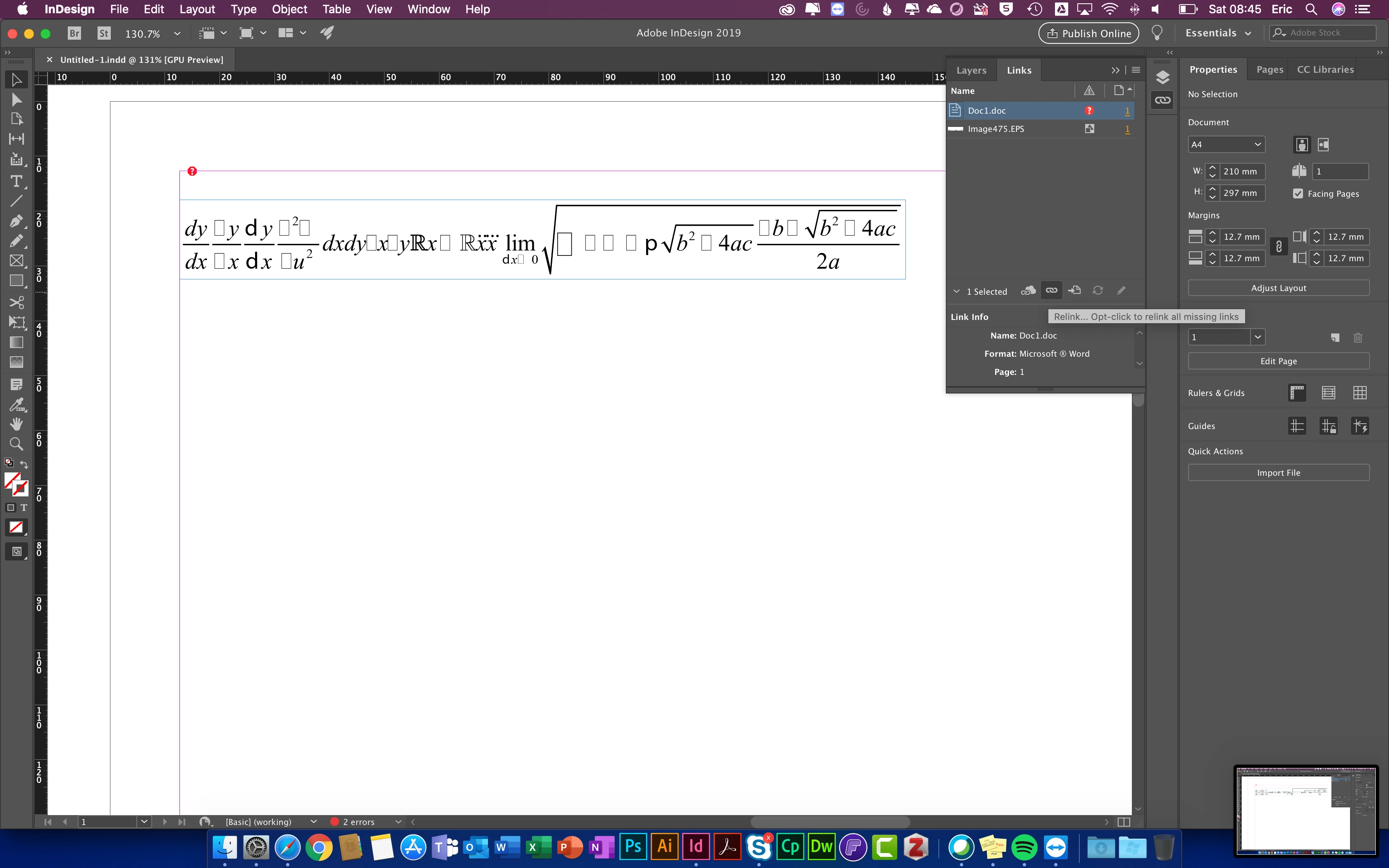
  1. Open your Links panel (from the Window menu). It will list all the resources connected to your document , like the cover. As the links are broken, you can select the file (jpg for cover) then use the relink icon to browse for it on your system, instead of the previous user. (look at the top right of the screen shot below.
  2. There is a previous thread about the .mobi here InDesign Book to mobi file for Kindle readers
    It is a free plugin to download from Amazon, from this link https://www.amazon.com/gp/feature.html?ie=UTF8&docId=1000765271
  3. Regarding the CSS, check if you have a custom one made by the previous designer, during the export process you can specify it.

5 replies

rajeshp42310841
Participant
May 25, 2019

Thank everyone. The professional returned my email and sent me the cover jpg and css file. yay!. What I need to do is point the indd file to their new location. Any advice please?

The epub will be reflowable.

Thank you all

Derek Cross
Community Expert
Community Expert
May 25, 2019

Is the ePub a Reflowable ePub or a FXL ePub?

And which version of InDesign do you have?

rajeshp42310841
Participant
May 25, 2019

Hi All,  All managed to fix the folder issues and now i created an epub with the css and cover. I am now going to try creating a mobi file using the instructions provided in this thread. You guys are great.

Eric Dumas
Community Expert
Community Expert
May 27, 2019

Hi, That os great news, well done.

Don't forget to tag our answers as helpful or correct answer to help other users with similar issues

Peter Villevoye
Community Expert
Community Expert
May 25, 2019

The restoring of the cover might be a bit problematic. The file needed to serve as the cover is not included in the Package folder and not mentioned in the list in the Links panel. However, as you have noticed, you can get a clue by scrubbing over the expected file's name and location when scrubbing through the recent setting in the ePub Export dialogue. This can help you to search for that file. Once found, you simply use the folder icon to browse to the retrieved file.

The missing CSS file might be found in a similar way. In that same dialogue you can see where the CSS file was expected (name and location). If the indication is truncated by the text field, then just point at it and a popup will reveal the full path to the file.

Recreating the mobi files for KDP is something which isn't handled by InDesign. See Eric's answer for more info on that. Also note that many points of sale require certain extra actions and additions to handle e.g. DRM. Publishers should be able to help you out with that.

And do take Derek's answer at heart: make a backup copy of all original files right now, so when you mess up something, you can always roll back to the earlier state.

rajeshp42310841
Participant
May 25, 2019

Hi, Thank you. I saw the paths of both the cover and css file. They were n the person google drive. I have the front cover so can redirect the epub and mobi to it. I DO NOT have the css file.  Can I recreate an epub and mobi without the css file the formatting professional was using? Can i recreate it somehow?

I am a novice and need InDesign to create it if i really need one.

Thank you.

jane-e
Community Expert
Community Expert
May 25, 2019

InDesign can generate the .css when you export or you can use your own.

Derek Cross
Community Expert
Community Expert
May 25, 2019

Before you do anything, make copies of your original files so that if you mess things up (you may well!), you can go back to the "good" copies and start again.

Eric Dumas
Community Expert
Eric DumasCommunity ExpertCorrect answer
Community Expert
May 25, 2019

Hi,

  1. Open your Links panel (from the Window menu). It will list all the resources connected to your document , like the cover. As the links are broken, you can select the file (jpg for cover) then use the relink icon to browse for it on your system, instead of the previous user. (look at the top right of the screen shot below.
  2. There is a previous thread about the .mobi here InDesign Book to mobi file for Kindle readers
    It is a free plugin to download from Amazon, from this link https://www.amazon.com/gp/feature.html?ie=UTF8&docId=1000765271
  3. Regarding the CSS, check if you have a custom one made by the previous designer, during the export process you can specify it.
Peter Villevoye
Community Expert
Community Expert
May 25, 2019

Hey Eric, regarding the cover image: this file is not included in the Links panel or Package folder ! A nasty and unfortunate hiatus in InDesign's approach for collecting and keeping track of all resources for any publication...