Inspiring
Feb 22, 2024 7:26 AM UTC
Answered

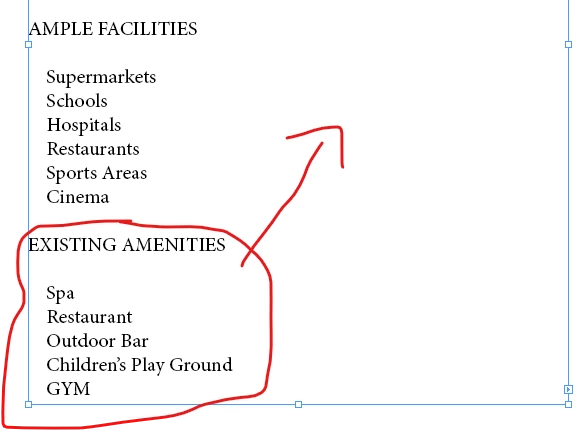
hi guys, How do I place the text parallel within one text frame in InDesign?


This topic is closed to new replies. Start a new post to keep the conversation going.
wiselocCorrect answer
Inspiring
Feb 22, 2024 8:26 AM UTC

One possible way:

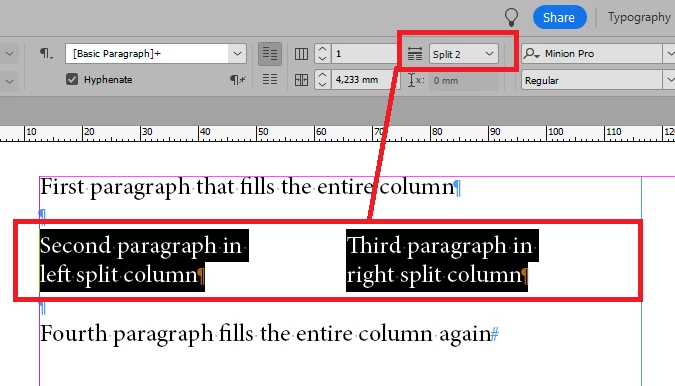
Assuming you have a one-column text frame, select all paragraphs that should have the two-column layout and assign "Split 2" to them:


3 replies

jmlevy
Community Expert
Community Expert
Feb 22, 2024 8:51 AM UTC

Why don't you simply use a 2 columns frame?

Translate
wiselocCorrect answer
Inspiring
Feb 22, 2024 8:26 AM UTC

One possible way:

Assuming you have a one-column text frame, select all paragraphs that should have the two-column layout and assign "Split 2" to them:


Translate
Inspiring
Feb 22, 2024 8:47 AM UTC

Thank you very much! it works.


Translate