Participating Frequently
June 3, 2019
Answered

"Hidden until triggered" buttons appearing on thumbnails in Publish Online

  • June 3, 2019
  • 4 replies
  • 4412 views

Hi!

I have created an ebook with navigational menu that opens up when clicked, using the reference from this tutorial which uses mainly Show/Hide buttons:

https://www.martinasartor.com/blog/2017/7/4/create-an-interactive-burger-menu-in-a-pdf-with-adobe-indesign-cc-2017-tutor…

Then I used the Publish Online feature in InDesign. The navigation buttons work perfectly, but the only issue is that if I click on the thumbnails button, it shows the full navigation menu buttons which are supposed to be "Hidden until triggered". I have attached the image for easier reference (the highlighted greyed box is my navigation menu that should only open when I click on the top left burger menu button).

Does anyone have any idea why this is so, or is there a better way to creating the navigation menu?

Thanks in advanced!
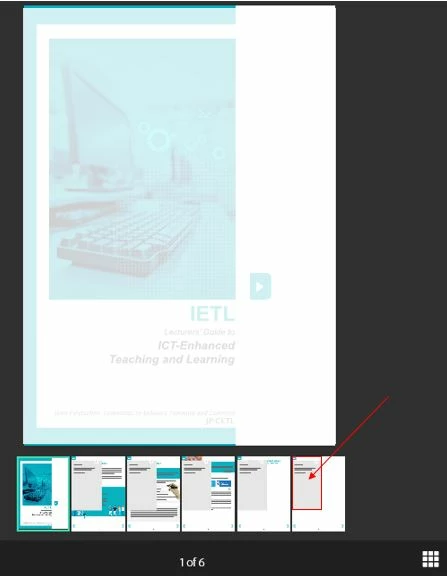
    This topic has been closed for replies.
    Correct answer BobLevine

    Hidden until triggered is not the best way to handle this, IMO. I wrote this years ago for DPS but it should work in Publish Online as well:

    https://www.boblevine.us/digital-publishing-suite-101-how-to-hide-a-slideshow/

    Note that the plugin I used to make this a bit easier has not been updated for InDesign 2019.

    4 replies

    Participating Frequently
    June 11, 2019

    I just realised actually we could simply make sure the first state (to open the navigation menu) is selected at the Object States Panel, so the second state of displaying the navigation menu doesn't appear in the thumbnails! *phew*

    Thanks all for your great help and tips!

    Participating Frequently
    June 10, 2019

    Hi all,

    I think I've managed to fix it. I made the multi state object as "Hidden until triggered" but had to create an exact open navigation menu button that is not part of the multi state object. Not sure if this is the best way but at least it works! Sounds kinda confusing, I hope u guys understand.

    Thanks for helping out anyway! =)

    BobLevine
    Community Expert
    BobLevineCommunity ExpertCorrect answer
    Community Expert
    June 10, 2019

    Hidden until triggered is not the best way to handle this, IMO. I wrote this years ago for DPS but it should work in Publish Online as well:

    https://www.boblevine.us/digital-publishing-suite-101-how-to-hide-a-slideshow/

    Note that the plugin I used to make this a bit easier has not been updated for InDesign 2019.

    Participating Frequently
    June 11, 2019

    Thanks BobLevine!

    Diane Burns
    Inspiring
    June 6, 2019

    It seems your final output is PDF? If so, multi state objects won’t work. Butttons will work, as long as the PDF is opened in Acrobat (which is difficult to control).

    Please share the Publish Online link.

    If you make Publish Online the final destination output, then you can use multi state objects instead.

    Participating Frequently
    June 10, 2019

    Hi Diane,

    Thanks for responding to my question! My final output is a Publish Online link. I tried using multi state objects as well but the navigations still open up at the Thumbnails.

    You can see the link here: https://indd.adobe.com/view/841e0d5d-b06b-4bbc-a4f9-84404d549907

    BobLevine
    Community Expert
    Community Expert
    June 3, 2019

    Show/hide buttons is not the best way to do this. I'd create that navigation menu using a multi state object instead. Far superior and way easier to manage.

    Participating Frequently
    June 10, 2019

    Hi BobLevine,

    I tried using multi state objects too but it still shows click I click the Thumnails.

    You can see the link here: https://indd.adobe.com/view/841e0d5d-b06b-4bbc-a4f9-84404d549907