
Participant
December 3, 2018
Answered

Hidden XML elements in layout

  • December 3, 2018
  • 2 replies
  • 6436 views

Hi everybody, I have started to work on a layout begun from another designer.

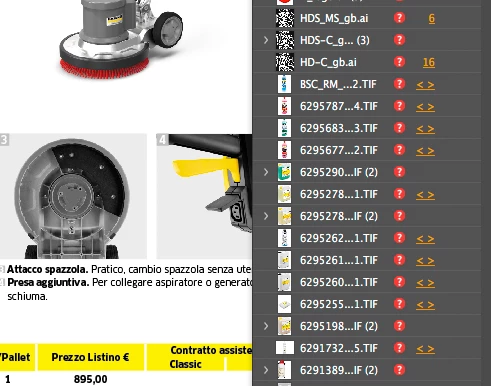
When I go in the Links panel I find many objects that are missing but at the same time that are not present in my layout.

(Screenshot attached)

The panel says they are XML elements not present in my layout. I tried to find a way to eliminate them but without success.

Is anybody able to give me a solution?

Thanks,
Luca

    This topic has been closed for replies.
    Correct answer hammer0909

    Start by opening the Structure pane in InDesign by choosing View > Structure > Show Structure. It sounds like someone imported XML into your document but never actually used it in the layout. Click on the Root element in the Structure pane (that's the top-most element) and hit the delete key on your keyboard. It will ask if you want to remove all of the structure from the layout. Click Yes. Now I'm assuming that the XML is not actually being used in this document. If it is, it will mess up the configuration of the XML workflow. It sounds however that maybe someone was experimenting and the XML was never used. I've not seen the document so it's difficult to tell.

    2 replies

    hammer0909
    Community Expert
    hammer0909Community ExpertCorrect answer
    Community Expert
    December 3, 2018

    Start by opening the Structure pane in InDesign by choosing View > Structure > Show Structure. It sounds like someone imported XML into your document but never actually used it in the layout. Click on the Root element in the Structure pane (that's the top-most element) and hit the delete key on your keyboard. It will ask if you want to remove all of the structure from the layout. Click Yes. Now I'm assuming that the XML is not actually being used in this document. If it is, it will mess up the configuration of the XML workflow. It sounds however that maybe someone was experimenting and the XML was never used. I've not seen the document so it's difficult to tell.

    lucmalacAuthor
    Participant
    December 3, 2018

    Hi Chad thanks for your answer.  will try this way.

    Luca

    Eric Dumas
    Community Expert
    Community Expert
    December 3, 2018

    Hi,

    Please always include the version of your OS and InDesign application, just in case it makes a difference.

    Have you tried to edit the XML file? or re-export from the source database?

    can you also confirm if you need these pictures or if they are obsolete?