
christinar26191074
Participant
August 16, 2017
Answered

Highlighted text (using layman's language, not Adobe InDesign language)

  • August 16, 2017
  • 6 replies
  • 3004 views

Hello,

I am a self taught user of InDesign. This means I am able to create and edit stuff transferring knowledge that I learned from other programs to InDesign.

Unfortunatley, I somehow "highlighted" text. You know what highlighting means in Microsoft Word context, there is an icon with a highlighter pen, you choose the color, select the text you want and the text becomes highlighted.

I don't think InDesign calls it "highlighting text" because I can't figure out what I did to create the highlight, nor can i figure out how to get rid of it. My document is useless until I figure out the correct InDesign term along with the correct procedure to undo it.

Appreciate your help.
This topic has been closed for replies.
Correct answer barbara_a7746676

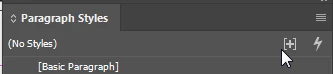
The only thing I see is a small blue highlight at the end of one of the paragraphs that indicates a style override. It looks like a space character so you could just delete it. If you leave the character, then you need to get rid of the style override.

To get rid of it, in the paragraph styles panel, click on any one of the styles in the list and click the icon in the upper right.

6 replies

rob day
Community Expert
Community Expert
August 16, 2017

InDesign also has Composition preference (Preferences>Composition>Highlight), which highlights potential typographic problems. the highlight does not print.

Bill Silbert
Community Expert
Community Expert
August 16, 2017

Without seeing a screen shot of what you're talking about I can talk about two possible scenarios as to why there is highlighted text in your InDesign file. If you are seeing text highlighted in a pinkish-salmon color then InDesign is telling you that the required font is not actually opened and that the program is showing a substitute font. For the second scenario see the screen shot:

The shading option highlighted above highlights an entire paragraph in whatever color you choose with the drop-down menu to the right of the option. Uncheck the option and the highlighting will go away.

If neither of these two possibilities are correct for your situation, please post a screen shot of what the problem is.

christinar26191074
Participant
August 16, 2017

I hope you can enlarge to see the screen shot. I think you are correct that its something to do with paragraph. I checked the shading it does not indicate color. I think its in paragrapgh setting. However I can't find the paragraph setting icon. Thank you!

christinar26191074
Participant
August 16, 2017

I see the "layers" and the "text" on the right side. I am assuming this is how I set the master formatting (I used a template from InDesign which is why I don't know how it was created from scratch). I printed my document to validate the blue does not show in print, and in fact it does not. So I then wanted to edit the properties of the text boxes and assumed that "layers" was the place to do so. When I did, all the text in the box I changed became highlighted in blue. I do want consistent formating through all sections, and I want to change font size. How do I let the program know I'm doing this on purpose and I want all to be consistent?

Thank you

barbara_a7746676
Community Expert
Community Expert
August 16, 2017

As SJRiegel suggested, it could be a missing font. If that is the case, you'll either need to install the font on your system or go to Type > Find Font and replace it with one on your system.

Legend
August 16, 2017

If the highlighting is blue, then you have style overrides in your text

https://indesignsecrets.com/why-is-my-indesign-text-highlighted-in-blue.php

barbara_a7746676
Community Expert
Community Expert
August 16, 2017

One way to get the highlighted text would be with an underline. It's a Character setting.

Janeisfab
Participant
March 26, 2020

Thanks so much for this, it really helped me out!


Legend
August 16, 2017

What color is the "highlight? 

If it's pink, then it means that the font is missing from your system.