
Participant
February 2, 2021
Answered

Highlighting Effect Behind White Text

  • February 2, 2021
  • 1 reply
  • 1799 views

I'm using an InDesign template, running InDesign 2020.


I'm adding a new text block to the project. Everything functions normally until I try to change the text to white. Then I get a blue background, like the highlighting function in Word. I can't find this under any of my text block panel settings. When I switch back to black text, it's transparent again. As you can see, it's not filling the whole block either.
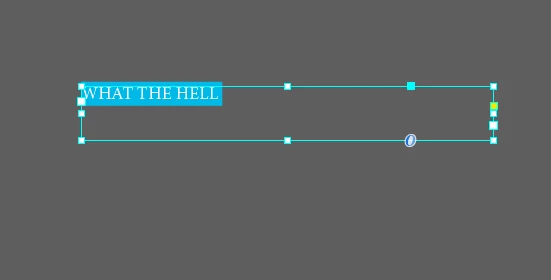


I've searched other community questions and can't find anything about this particular issue. It's not a missing font, either. This is Minion Pro, and it's the same story for any other font I switch to.


Correct answer jmlevy

It looks like you have enabled paragraph shading. Check your paragraph style or the dropdown menu at the very right end of the control panel.

1 reply

Eric Dumas
Community Expert
Community Expert
February 2, 2021

Hi,

Can you confirm if the text is on the pasteboard with the page preview activated?


Participant
February 2, 2021

Yes, it is on the pasteboard with activated preview. And when I did a test export to pdf and png it kept the colour behind, too. 

jmlevy
Community Expert
jmlevyCommunity ExpertCorrect answer
Community Expert
February 2, 2021

It looks like you have enabled paragraph shading. Check your paragraph style or the dropdown menu at the very right end of the control panel.