

dublove
Legend
May 8, 2025
Question

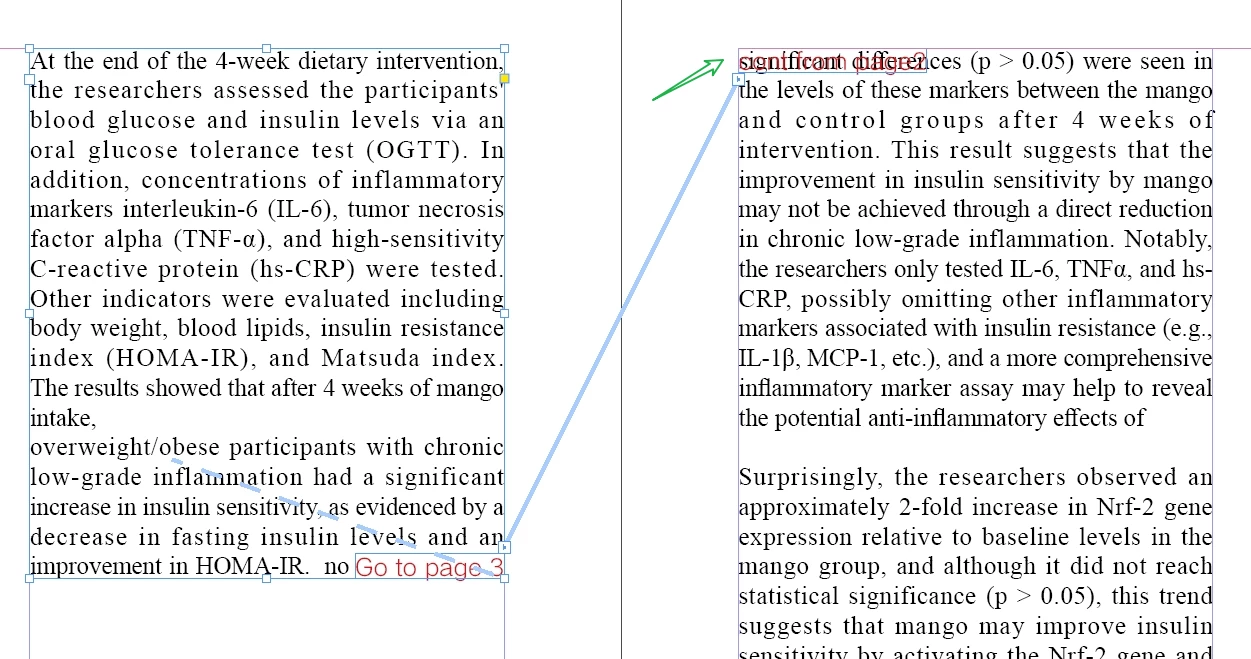
Hopefully one day the positioning object will have a wrap-around effect on the text above it

  • May 8, 2025
  • 3 replies
  • 820 views

Hopefully one day the positioning object will have a wrap-around effect on the text above it


This issue is too bad.
It would be so nice to locate objects without this problem.

This one turns down, picks up, do you have a better way to control it?
 

3 replies

Community Expert
May 8, 2025

Your issue is that you anchored it after the text. For wrap around to work it has to be anchored before the text.


If you anchor to the Left column text it should work

dublove
dubloveAuthor
Legend
May 8, 2025

This is not very realistic for you.
Right now it's in the cross-page (2-3), it works, when it's in the up and down pages (3-4), your positioning object is invalid.

Community Expert
May 8, 2025

I'm not saying what's realistic or not - I'm explaining how it currently works, it's the same limitation we all face. 


You have it inserted as an anchor at the bottom of the text frame. However, this is the issue, as the anchor must be before the text. 


So if you anchor to the first paragraph on the Left Page it works, you could put it in the same anchor position as your Continued on Page 3 - that way they are both located in the same area. 


But of course, you have to be careful not to delete it when updating the text. 


Sometimes things are not logistically possible and either accept the workaround - or find a neater way of achieving what you want to do.


Robert at ID-Tasker
Legend
May 8, 2025

@dublove


It has been discussed many times before - if object will affect text before - its Anchoring point will be affected - which will change location of the object - which will again affect text before - which will affect object's position...


Never-ending loop. 


dublove
dubloveAuthor
Legend
May 8, 2025

Please believe in the great Adobe

Bill Silbert
Community Expert
Community Expert
May 8, 2025

You can log this as a feature request at: https://indesign.uservoice.com/forums/601021-adobe-indesign-feature-requests. Doing this will call this to the attention of the people who actually decide what features future versions of InDesign will contain.