Inspiring
July 22, 2014
Answered

How can find text only in second column of cell?

  • July 22, 2014
  • 2 replies
  • 561 views

Hi, everyone

I only want to find second column of dollar sign
aim to apply to character style: "Bold+Italic",

I can I make it happen?

screenshot:
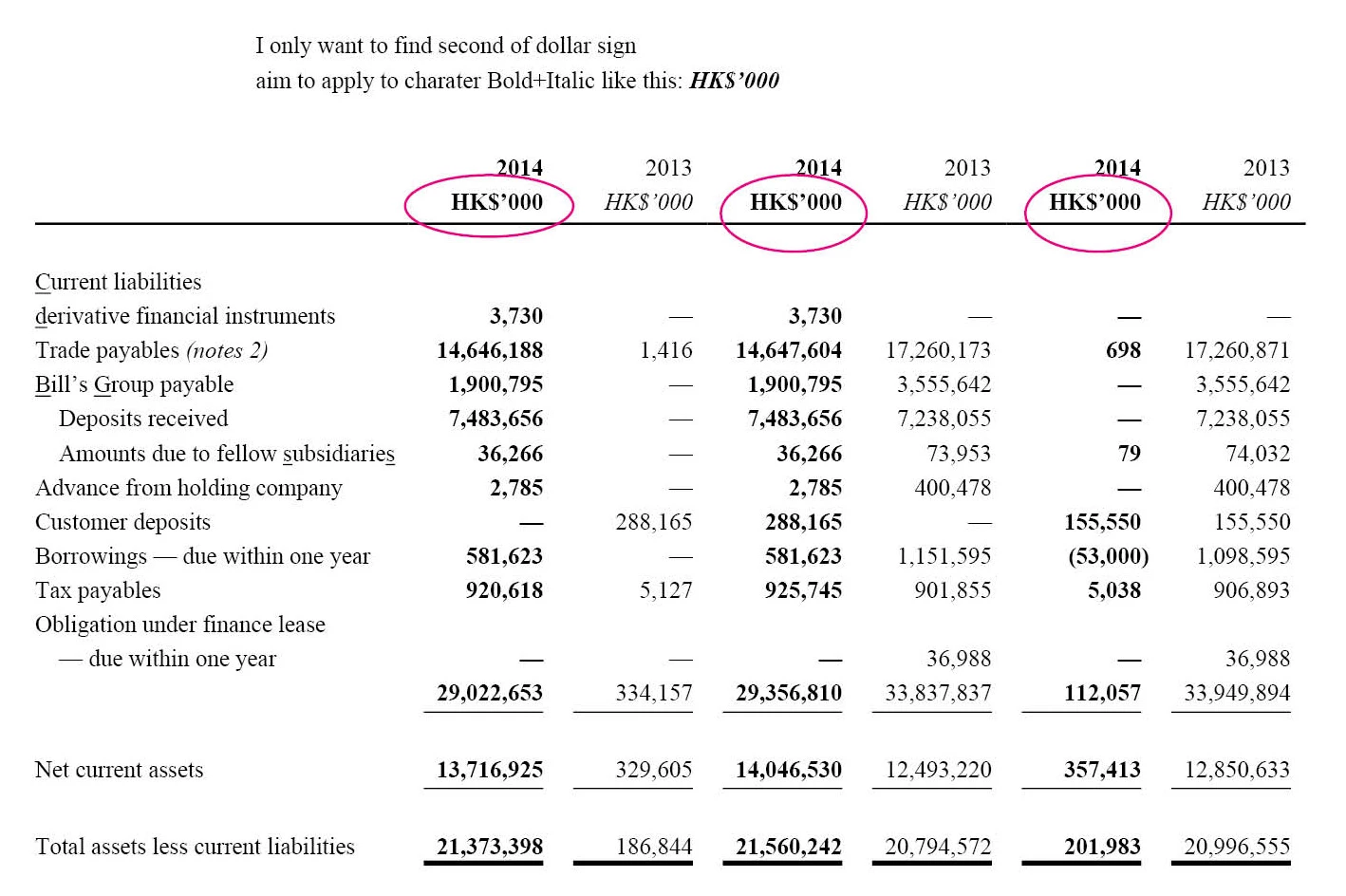
I have this script, can someone help me to change it's function?

if ( app.selection.length > 0 && ( app.selection[0].constructor.name == "Cell" || app.selection[0].constructor.name == "Table" ) ) {  

    if ( app.scriptPreferences.version >= 6 ) { 

        app.doScript( main, ScriptLanguage.JAVASCRIPT , [], UndoModes.ENTIRE_SCRIPT, "style every second column in selection" );          

    }  

    else { 

        main(); 

    } 

} else { 

    alert ( "Nothing or wrong selection!" ); 


function main() { 


    var myColor = "PANTONE 252 U"; 

    var myFillTint = 20; 

    var myCharStyleName = "Bold"; 


    var curSel = app.selection[0]; 

    var allCells = curSel.cells; 

    var startCol = curSel.cells[0].name.split(":")[0]*1;    

    var endCol = curSel.cells[-1].name.split(":")[0]*1;    

    var counter = startCol + 1; 


    for ( var i = 0 ; i < allCells.length; i++ ) { 

        var curCell = allCells

        var curCol = curCell.name.split(":")[0]*1; 


        if ( curCol == counter ) { 

            curCell.fillColor = myColor; 

            curCell.fillTint = 20; 

            curCell.texts[0].appliedCharacterStyle = myCharStyleName; 

            counter = counter + 2; 

        } 


        if ( counter > endCol ) { 

            counter = startCol + 1; 

        } // end if 

    } // end for 

} // end main

John

This topic has been closed for replies.
Correct answer Chinnadk

Hi Chinna,


What if I add something into it, Can it working?

var doc = app.activeDocument, 

    _selection = app.selection[0]; 

    for(var i =1;i<_selection.columns.length;i+=2) 

    { 

    var _cells = _selection.columns.cells; 

    for(var j =0;j<_cells.length;j++) 

            {

    // I think have to add a function in here like this:

app.findGrepPreferences = app.changeGrepPreferences = null;

app.findGrepPreferences.findWhat = "HK\\$\\'000";

                   _cells.texts[0].appliedCharacterStyle = "Bold+Italic"; 

                } 

app.findGrepPreferences = app.changeGrepPreferences = null;

        }


John


Hi John,

Is this you need?

var doc = app.activeDocument,

    _selection = app.selection[0];

for(var i =1;i<_selection.columns.length;i+=2)

{

        var _cells = _selection.columns.cells;

        for(var j =0;j<_cells.length;j++)

        {

                var reg = new RegExp("\\$")

                if(reg.test(_cells.contents))

                {

                        _cells.texts[0].appliedCharacterStyle = "bolditalic";

                    }

            }

    }

Regards,

Chinna

2 replies

JohnwhiteAuthor
Inspiring
July 23, 2014

Hi Chinna

It works like a pro

Thank you so much

John

Chinnadk
Legend
July 23, 2014

Hi John,

Try this.

var doc = app.activeDocument,

    _selection = app.selection[0];

for(var i =1;i<_selection.columns.length;i+=2)

{

        var _cells = _selection.columns.cells;

        for(var j =0;j<_cells.length;j++)

        {

                _cells.fillColor = "PANTONE 252 U";

                _cells.fillTint = 20;

                _cells.texts[0].appliedCharacterStyle = "Bold";

            }

    }

Regards,

Chinna

JohnwhiteAuthor
Inspiring
July 23, 2014

Hi, Chinna

thank you for your help,

but I only want to make the second column's dollar sign ("HK$'000") Bold and italic,

the rest remain the same

can you help me to make it happen?

John

JohnwhiteAuthor
Inspiring
July 23, 2014

Hi Chinna,


What if I add something into it, Can it working?

var doc = app.activeDocument, 

    _selection = app.selection[0]; 

    for(var i =1;i<_selection.columns.length;i+=2) 

    { 

    var _cells = _selection.columns.cells; 

    for(var j =0;j<_cells.length;j++) 

            {

    // I think have to add a function in here like this:

app.findGrepPreferences = app.changeGrepPreferences = null;

app.findGrepPreferences.findWhat = "HK\\$\\'000";

                   _cells.texts[0].appliedCharacterStyle = "Bold+Italic"; 

                } 

app.findGrepPreferences = app.changeGrepPreferences = null;

        }


John