

Answered
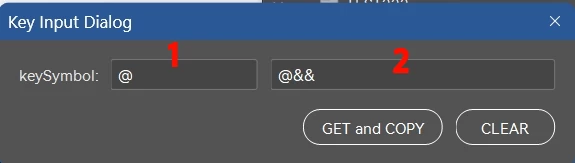
How can I click Get button and have the result calculated from box 1 displayed in box 2?
I want to enter some characters in box 1 and then calculate it by some formula and display the result in box 2 after clicking Get button.
then:
Click the GET button to display the results in Box 2 and copy the results.
Tap the CLEAR button to clear box 2.
How can I modify the code?
Thanks a lot.
// Create a new window
var win = new Window("dialog", "Key Input Dialog");
// Group for keySymbol input
var inputGroup = win.add("group");
inputGroup.add("statictext", undefined, "keySymbol:");
var keyInput1 = inputGroup.add("edittext", undefined, "@");
keyInput1.characters = 10;


var myResult = keyInput1.text + '&&';

var keyInput2 = inputGroup.add("edittext", undefined, myResult);
keyInput2.characters = 20;


// Buttons group
var btnGroup = win.add("group");
btnGroup.alignment = "right";

var okBtn = btnGroup.add("button", undefined, "GET and COPY");   // OK
var cancelBtn = btnGroup.add("button", undefined, "CLEAR"); // Cancel

// Button click events
//okBtn.onClick = function () {
//    var selectedRadio = radio1.value ? "Option A" : "Option B";
//    var selectedDropdown = dropdown.selection.text;
//    alert(
//        "You entered: " + keyInput.text +
//        "\nRadio Selected: " + selectedRadio +
//        "\nDropdown Selected: " + selectedDropdown
//    );
//    win.close();
//};

cancelBtn.onClick = function () {
    win.close();
};

// Show the dialog
win.center();
win.show();


 AdChoices