Known Participant
February 18, 2025
Question

How can I create side-by-side bullet lists?

  • February 18, 2025
  • 2 replies
  • 2770 views

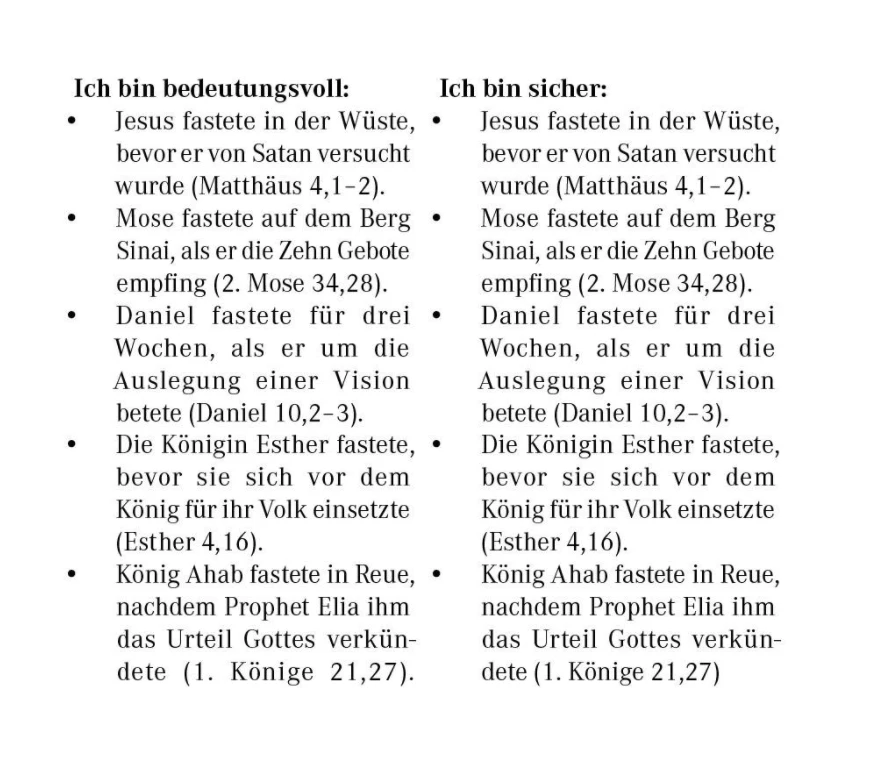
How can I create something like this in InDesign? Thank you for any help!
2 replies

Robert at ID-Tasker
Legend
February 18, 2025

@Mateomono


Is it a contents of the same thread / Story - or two separate threads / Stories?


MateomonoAuthor
Known Participant
February 18, 2025

@Robert at ID-Tasker What Is a thread / Story?

MateomonoAuthor
Known Participant
February 19, 2025

Du verwendest 2 Textrahmen? Wozu? Verwende 1 Textrahmen für die gesamte Seite und arbeite mit der Funktion Spaltenspanne im Absatzformat.


@Willi Adelberger Ich bin ziemlich neu in InDesign und war der Meinung, dass es so gemacht werden muss.  Wie mache ich das am besten? Wird das auch in meinem Fall funktionieren, da der Text links und rechts nicht miteinander verbunden sind? Also, die linke Seite soll nicht in die rechte Seite überlaufen.

BobLevine
Community Expert
Community Expert
February 18, 2025

Two columns or two text frames side by side.

Paragraph style for the heading and one for the bullets.


That's really all there is to it. If you need details, let us know.

MateomonoAuthor
Known Participant
February 18, 2025

@BobLevineThank you! I think I will try the two-column option. This is achieved with the table feature, right?

BobLevine
Community Expert
Community Expert
February 18, 2025

You can go that route if you'd like but I would create two text frames side by side.
