



Question
How can I eliminate the line spacing discrepancies caused by different line counts when “adding or removing a line”?
Select the range from the first line to the “Only by” line (blue), run the script, and the gap between the bottom text and the bottom of the text box will be essentially the same as before.
However, when you select the range from the first line to the “help efforts” line (orange) and run the script, the gap between the bottom text and the bottom of the text box becomes noticeably larger.
Where does this discrepancy come from, and how can it be avoided?
Even if you change `selLinesNum` to `selLinesNum-1`, the same problem will occur.
The goal is to add (or remove) one row at a time.
Does the formula look wrong?
var d = app.activeDocument;
var item = d.selection[0];
var zp = app.activeDocument.zeroPoint;
app.activeDocument.zeroPoint = [0, 0];
var selLinesNum = item.lines.length;
// Get the text frame height
var tsf = item.parentTextFrames;
var sb = tsf[0].visibleBounds;
var boxH = sb[2] - sb[1];


// Get current font size and line spacing
var fontSize = item.pointSize;
var ole = item.leading;


// Desired number of lines for the text frame
var selLinesNum;
var newLeading = ole * (fontSize / (selLinesNum));
//var newLeading = ole * (fontSize / (selLinesNum-1));
item.leading = newLeading;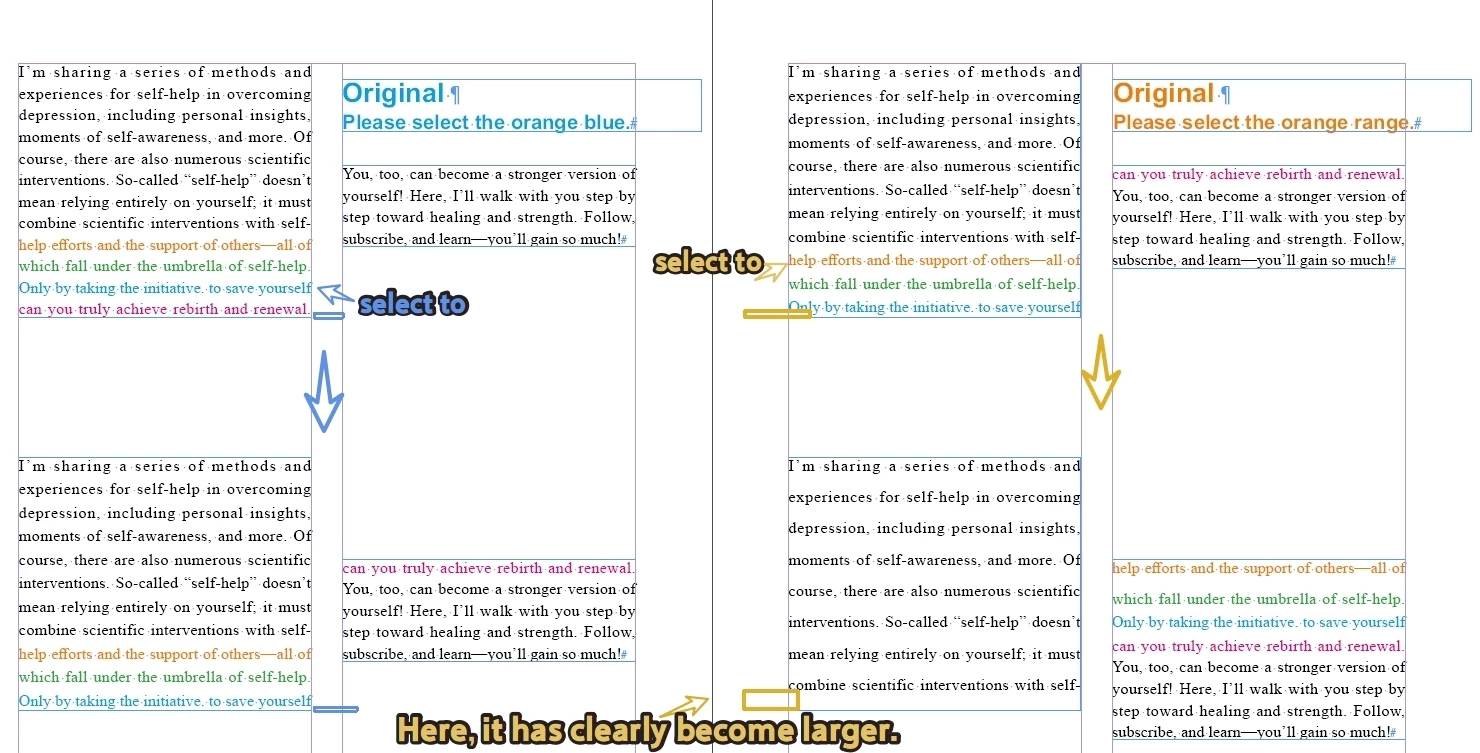
 AdChoices