
Known Participant
November 27, 2024
Question

How can I ensure consistency with my form lines not being on the baseline grid?

  • November 27, 2024
  • 2 replies
  • 638 views

Hi, 

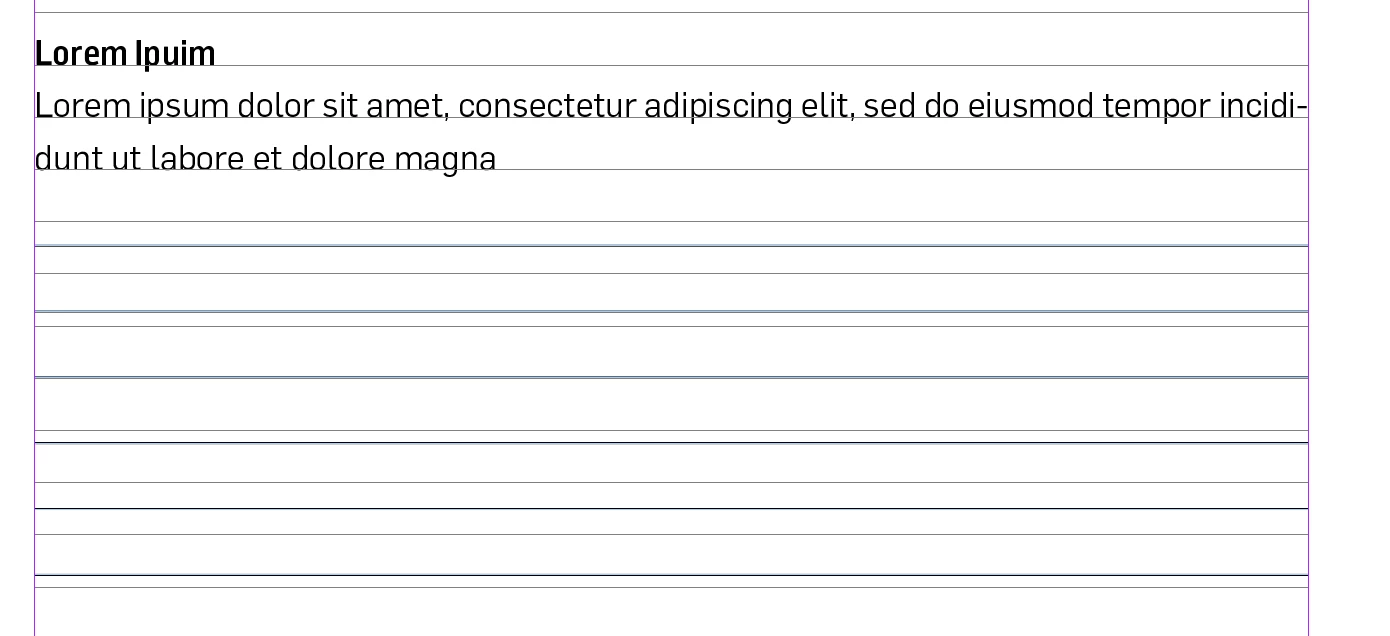
I'm working on a book layout and there is a section where the reader can write notes. The problem is that the form lines don't align with the baseline grid (due to the varying heights). If I align it with the baseline there wont be enough space for writting. 
How can I ensure consistency across the book despite the it not being aligned to the baseline grid?

Thank you!
This topic has been closed for replies.

2 replies

James Gifford—NitroPress
Legend
November 27, 2024

That's the rub with baseline grids — they are either/or, and if you use them, you are limited in your layout choices unless you start using exceptions and overrides, which starts to defeat the purpose of using them at all.


My first and simple advice is that while baseline grids are an asset in formal publications, with lots of text, especially in two or more columns, they are just an unnecessary and limiting option for more free-form works... and a cookbook is almost always a page-by-page jumble of paragraph and section types. I can't see making the content conform to baselines bringing anything to the final result. (You might as well decide all your instructions have to be two and only two lines long, or some other arbitrary choice.)


If you have content that won't easily fit to baselines (and again, I'm trying to imagine a cookbook where even 50% of the content does), you have three choices —

  • Use the half-height baseline method (7pt baselines for a general 14pt line spacing layout), and use the half-steps to adjust things like heading and list positioning. This would be an option for your write-in lines but you'd be limited to exactly 1.5 lines. Also, when you use ANY half-step spacing, you have to use it in pairs or even multiples, or otherwise adjust things so that your bottom line on each page meets the bottom margin. (Since this is about half the reason to use baselines in the first place, you don't really want to leave half-step gaps at page bottom.)
  • Set some paragraphs either independent of the baseline grid, or lock the first line only. This allows more flexibility in spacing, but again you'll have to compensate or balance the overall column height so as not to leave a bottom gap. Gets tricky.
  • Be absolutely rigid in 1:1 baseline spacing and simply accept the results, esthetically and in awkward breaks.


Or just turn off the baseline grid for a project such as this and make esthetically pleasing choices for your various and assorted paragraph styles that better suit a cookbook layout. Turn baselines on when you do a novel, textbook or reference work. 🙂

MateomonoAuthor
Known Participant
November 27, 2024

Thank you for your advice. This is a nonfiction book, and I think using a baseline grid is probably best. Do you agree? Without it, the text might show through the paper, and things won’t align properly.

James Gifford—NitroPress
Legend
November 27, 2024

While a cookbook is technically a nonfiction book (excluding some fad and diet books I've seen 🙂 ) it's a special niche in its own right. Even the most "formal" books I have on my kitchen shelf don't begin to resemble what's usually called "nonfiction." Don't let some narrow interpretation of the terms drive your choices.


And if you are using a print process that lets print show through from the other page side... your problem is not the alignment of the content on each page.

Willi Adelberger
Community Expert
Community Expert
November 27, 2024

Set the leading if the line lines to the double value of the baseline grid and align to it. 

MateomonoAuthor
Known Participant
November 27, 2024

@Willi Adelberger 

But it might be too large then. My baseline grid leading is 18 pt. Wouldn't 32 pt be too large?

Willi Adelberger
Community Expert
Community Expert
November 27, 2024

What is, if you change the grid to 6pt? Does it work then?