
Participant
April 6, 2025
Question

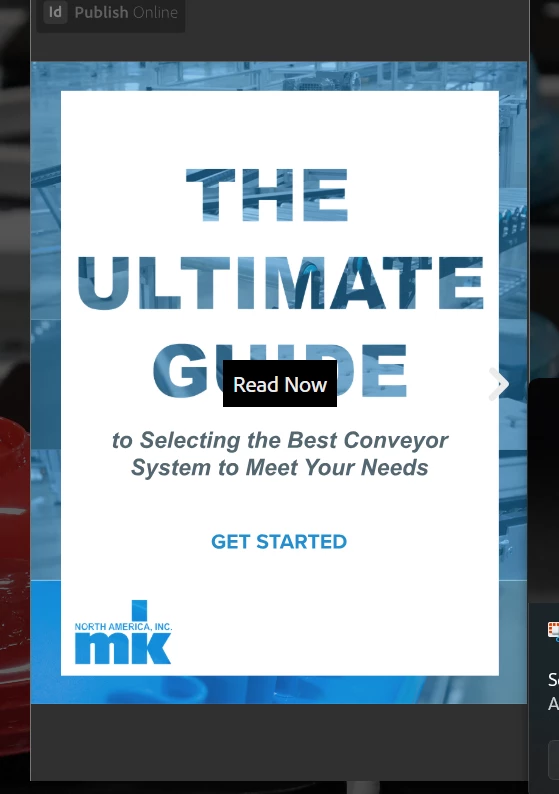
How can I get rid of the gray box and InDesign button/link at the top?

  • April 6, 2025
  • 2 replies
  • 174 views


How can I get rid of the gray box and ID Publish Online link? It's very frustrating and looks awful.


<iframe style="border: 1px solid #777;" src="https://indd.adobe.com/embed/831ef780-ae91-49a6-a464-8bc34806dfe2?startpage=1&allowFullscreen=true" width="900px" height="638px" frameborder="0" allowfullscreen=""></iframe>


This is the landing page: https://mknorthamerica.ac-page.com/the-ultimate-guide-to-selecting-the-best-conveyor-system-to-meet-your-needs-general?test=true


2 replies

Abhishek Rao
Community Manager
Community Manager
April 7, 2025

Hi @christer_8373,  


Barb is absolutely right. There currently isn’t a way to remove the gray box or the Publish Online branding, as it's part of Adobe's default setup for shared documents. The best step forward would be to submit a feature request on the InDesign UserVoice page. And when you do, it would be super helpful if you could share the link to that request here in the thread. This way, others who feel the same can upvote it and help bring more visibility to the idea. Looking forward to your update!


^

Abhishek 


Barb Binder
Community Expert
Community Expert
April 7, 2025

Hi @christer_8373:


That's Adobe's branding and there's not an option to turn it off. This is the community forum—users helping other users—so we can't do anything to change this.


You can file a feature request on InDesign's uservoice page: https://indesign.uservoice.com/ and hope that it is incorporated into a future version of InDesign. 


~Barb

~Barb at Rocky Mountain Training