Question
How can I make this text wrap effect?
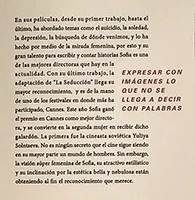
When I try to do this in the text wrap window, the phrase on the right is also affected by the rectangle I applied and I can't fit it in that space.

When I try to do this in the text wrap window, the phrase on the right is also affected by the rectangle I applied and I can't fit it in that space.
Already have an account? Login
Enter your E-mail address. We'll send you an e-mail with instructions to reset your password.


 AdChoices