
Participating Frequently
July 29, 2020
Answered

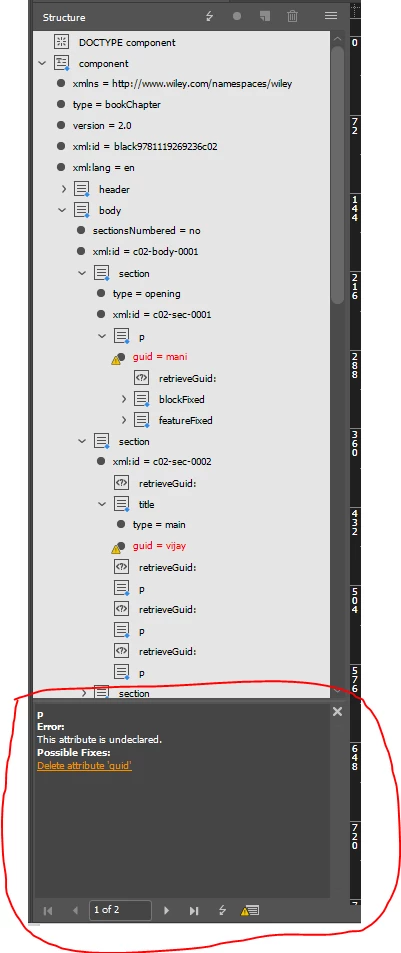
how can i open the validation error panel through extendscript
  • July 29, 2020
  • 1 reply
  • 570 views

i am validating xml structure based on dtd. when i validate manually in indesign, marked panel is opened but i validate through extendscript toolkit marked panel is not opening why??? how can i open that panel through extendscript please guid me.


This topic has been closed for replies.
Correct answer Dirk Becker

First time I've come across that panel - never tried a dtd with InDesign as I prefer xsd to validate. Another bag of bugs, using a random dtd from Oxygen yields some strange error messages. Enough ranted.


Note for plug-in developers, widget ID is kValidationSubPanelWidgetID.

kStructureValidateRootActionID has ID 0x133D9 - hex value, can be used with itemByID().

Localizable name is "Structure_ValidateRoot"


So this menu action won't just open the validation panel but also perform the validation. In other words, no way to check the check mark of the action to see whether it is opened, also no way to close.


Cheers

1 reply

Community Expert
July 29, 2020

You could hunt for a menu action. But I guess, there is no way.

To get a list of all menu actions you could use a script by Peter Kahrel:


Menu actions

https://creativepro.com/files/kahrel/indesign/menu_actions.html


Unfortunately all related discussions in the InDesign Scripting Forum Peter linked to are not with us anymore. They were not transfered to the new Adobe InDesign forum last year.


Properties and methods of menuActions can be found here:

https://www.indesignjs.de/extendscriptAPI/indesign-latest/#MenuAction.html

https://www.indesignjs.de/extendscriptAPI/indesign-latest/#MenuActions.html


Regards,
Uwe Laubender

( ACP )

Participating Frequently
July 29, 2020

Thanks for ur reply. I will try my best.