Kimbanjang
Participating Frequently
April 11, 2017
Answered

How can I outline texts with underline?

  • April 11, 2017
  • 6 replies
  • 10944 views

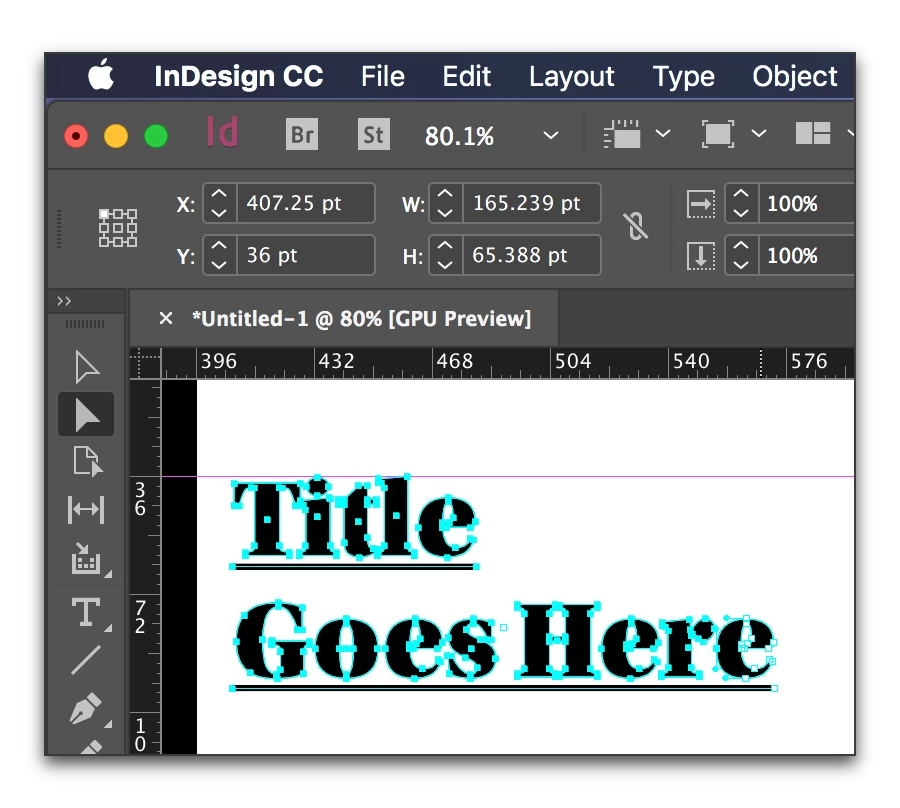
I met a big problem with outline feature. Like this,

1. Put it on some text

2. Underline (Shortcut - Ctrl+Shift+U)

3. Outline the underlined text.

4. Then, underline just gone.

So, How can I outline texts with underline?

    This topic has been closed for replies.
    Correct answer Barb Binder

    That is my experience as well. But you can select the frame, copy/paste it in Illustrator and do it there.

    The copy/paste it back into InDesign:

    I'm curious why you are outlining it, though.

    6 replies

    Participant
    June 16, 2021

    Ctrl ShiftU doesn't work on my desktop it just doesn't work


    Geоrge
    Legend
    April 12, 2017

    Don't forget to write about it in the future, o the greedy Jedi ))

    Remember, never say you can't do something in InDesign, it's always just a question of finding the right workaround to get the job done. © David Blatner
    Obi-wan Kenobi
    Legend
    April 12, 2017

    George,

    I'm not greedy! [ "ce genre de débat récurrent commence sérieusement à me gaver!!!" (in French)   ] … and not sure you work for free too!

    I've Google-searched for comments about this simple question: "How can I "really outline" texts with underline?" … and found nothing that seems relevant to me!

    I've just imagined a "script" way to fix it! …

    All the scripts I wrote since just one year [officially, 144; in fact, more than 300!] and all the tricks I imagined are first for my own work (I'm a book designer).

    When I don't give them for free [just take a look at my pro bono deals], if some want them, I'll sale them with pleasure!

    If they don't, no problem for me! I don't write scripts or other solutions for a "money" reason! … but it's not enough to hide a solution exists!

    So, keep cool, bro! Ваше здоровье!

    (^/)

    Willi Adelberger
    Community Expert
    Community Expert
    April 12, 2017

    There is not any reason to create outlines from fonts in InDesign as it causes a lot of problems. Don't do it! You loose underlines, bullets, numers, auto text, text variables, frame strokes, frame areas.

    DON'T OUTLINE TEXT.

    If a printer requires outlined text, choose a different one. Text in a PDF is embedded if the font does allow it.

    If a font does not allow embedding, you are neither allowed by its licence to outline it!

    If you need to have outlines for a cutting plotter later in a workflow, go to Acrobat Pro, Printproduction, Preflight and apply a preflight profile to outline text.

    Community Expert
    April 12, 2017

    Hi Willi,

    in post 4 of this thread the OP is answering the why behind the question:

    Because To control crash fonts problem when i open my indd file at other computer. …

    So we should tackle this problem first, I think.

    Why is this particular font crashing InDesign on the other machine?

    What OS versions are we talking about?
    What font is used?
    How are the files transferred to the other computer?

    What is the exact version of InDesign CS6 on both machines?


    ( Weren't there some problems with the very first version of InDesign ( v 8.0.0 ) regarding font management?
    So: Is InDesign CS6 on the latest available software version on both machines? )

    Regards,
    Uwe

    Willi Adelberger
    Community Expert
    Community Expert
    April 12, 2017

    I did read it. But this cannot be a solution for any crash. The problem is found deeper. Is the font damaged? Than it has to be changed to a different one. Is the installation corrupted? Uninstall it, clean it up and install it again.

    A not recommended feature is not a replacement for a wrong working functionality in any program. We have to go to the root of the problem.

    It is as if someone goes to the doctor to amputate his toes. The doctor does it without warning that guy and asking why he wants to do so. At the end he learns, that his stockings are to thick, so his shoes are to small. Ok, amputation did its job. But would it be the best solution?

    Obi-wan Kenobi
    Legend
    April 11, 2017

    Hi,

    Sometimes, The Force could help! …

    (^/) 

    Kimbanjang
    Participating Frequently
    April 12, 2017

    This would be good way to solve the problem Thank you very much

    vinny38
    Legend
    April 11, 2017

    Hi

    I think you should read this great article:

    https://indesignsecrets.com/converting-text-to-outlines-the-right-way.php

    Vinny

    Kimbanjang
    Participating Frequently
    April 12, 2017

    Actually, I already know this method that flatten all of texts when export PDF, I couldn't use it on this way. Thank you for remind me

    Kimbanjang
    Participating Frequently
    April 12, 2017

    I couldn't -> I didn't

    Barb Binder
    Community Expert
    Barb BinderCommunity ExpertCorrect answer
    Community Expert
    April 11, 2017

    That is my experience as well. But you can select the frame, copy/paste it in Illustrator and do it there.

    The copy/paste it back into InDesign:

    I'm curious why you are outlining it, though.

    ~Barb at Rocky Mountain Training
    Kimbanjang
    Participating Frequently
    April 11, 2017

    Because To control crash fonts problem when i open my indd file at other computer.

    And this method would be good as well. Thanks!

    Barb Binder
    Community Expert
    Community Expert
    April 12, 2017

    Ok. That makes sense, but of course you can't edit it.

    Are both computers on CC? If you opt to use the Typekit fonts that are included with your CC subscription, if you move a file from one computer to the other and don't already have the fonts installed, they will sync on opening. It's pretty handy and the type remains edible.

    ~Barb at Rocky Mountain Training