
Known Participant
January 23, 2025
Question

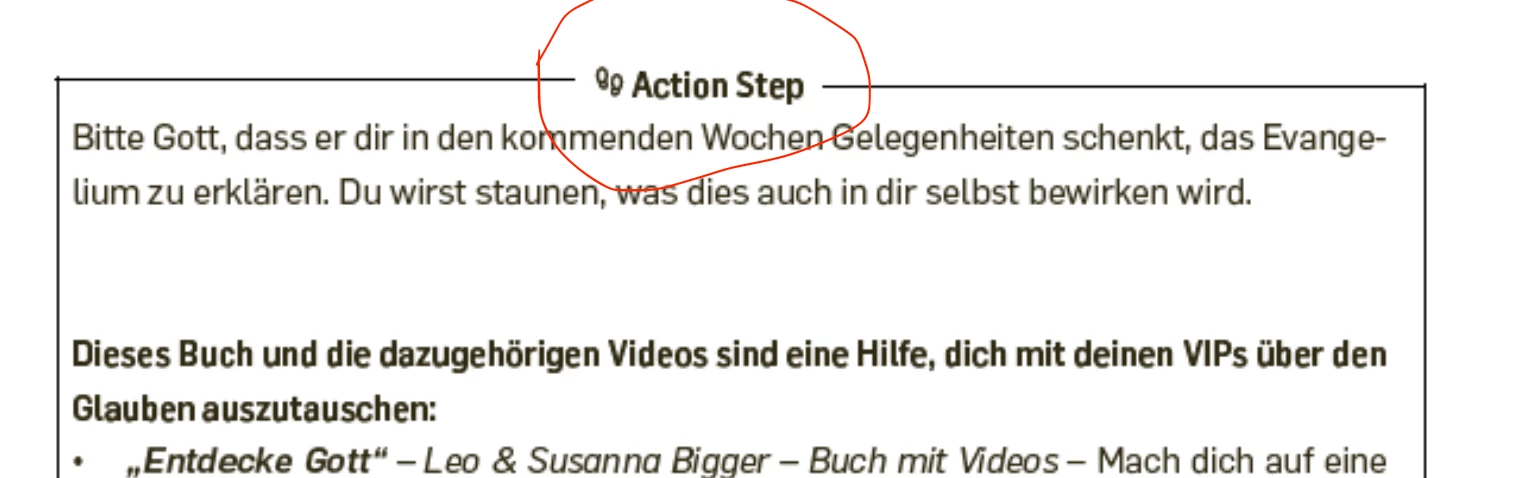
How can I set something like this up in Indesign and also create a style from it?

  • January 23, 2025
  • 3 replies
  • 529 views

Hi,

I would like to set up something like this for my book layout. I know how to create a basic rectangle box, but I want to achieve having the text on top, where the line doesn’t go through the text. How can I achieve that in InDesign and also create a style so I can reuse it across my book


Thank you!
3 replies

jmlevy
Community Expert
Community Expert
January 23, 2025

Hi @Mateomono 

have a look at my sample file.

MateomonoAuthor
Known Participant
January 23, 2025

@jmlevy 
Thank you very much! Did you follow the steps mentioned above, or did you use a different method?

James Gifford—NitroPress
Legend
January 23, 2025

Ah, I see, different approach. No (if I can jump in) he used a paragraph border around the BODY text and then a variant of the techniques described in the prior thread to put a white blanking stripe behind the title.


This is completely do-able with two styles (or perhaps a few variants to cover all situations) but does not make use of a text frame.

Robert at ID-Tasker
Legend
January 23, 2025

@Mateomono


Is it always top of the TextFrame - or you want to do this in the middle of the text?


James Gifford—NitroPress
Legend
January 23, 2025

It's trivial — see that prior example — to put the text atop a rule, which could be full column width, and that could be hacky-whacked into being the top line of a border, but if there's a way to make the text, dropout and following (simple, scalable, configurable) box work as a set, it's eluding me. Just as the surprise that the under/overlines are stacked and that can be used for the prior effect, that the text frame sits above all, pretty much no matter what, seems to be the chiller for this approach.

James Gifford—NitroPress
Legend
January 23, 2025

Interesting — I am sure we just solved a problem exactly like this but I can't locate the topic and my attempts to replicate the solution are falling short. If the text is in a box with an outer stroke, that stroke wants to be on top of any text effect like shading, rule, underline etc.


The basic steps should be —

  • Create a heading style that matches your example, with either Background Shading or a Paragraph Rule, in white, set to block out and frame the text (that is, limit the effect to text width with some offsets).
  • Set the Text Frame Baseline option to Fixed and adjust the offset so the heading is positioned as you like vertically.


I'm sure a variation of that worked before but... maybe this is a different case.


(I can't see any way to make this a single style but an Object Style for the frame and a Paragraph Style for the first paragraph/header in it is not a difficult combination to manage.)

James Gifford—NitroPress
Legend
January 23, 2025

That would be it, thanks. Couldn't come up with right search terms.


That the text frame outline is atop all content, virtual layer-wise, seems to kill the approach.