
How can I set up styles/properties so text in columns lines up vertically regardless of content?
I've been working with InDesign for exactly two days and am impressed enough to figure I must be missing something important, because I can't believe such capable software would require all kinds of one-off manual adjustments to get things looking right.
One of the first things I did was set up paragraph styles for title, sub-title, first paragraph, etc. I've used different font sizes and some space-after settings for these, as well as column-spanning.
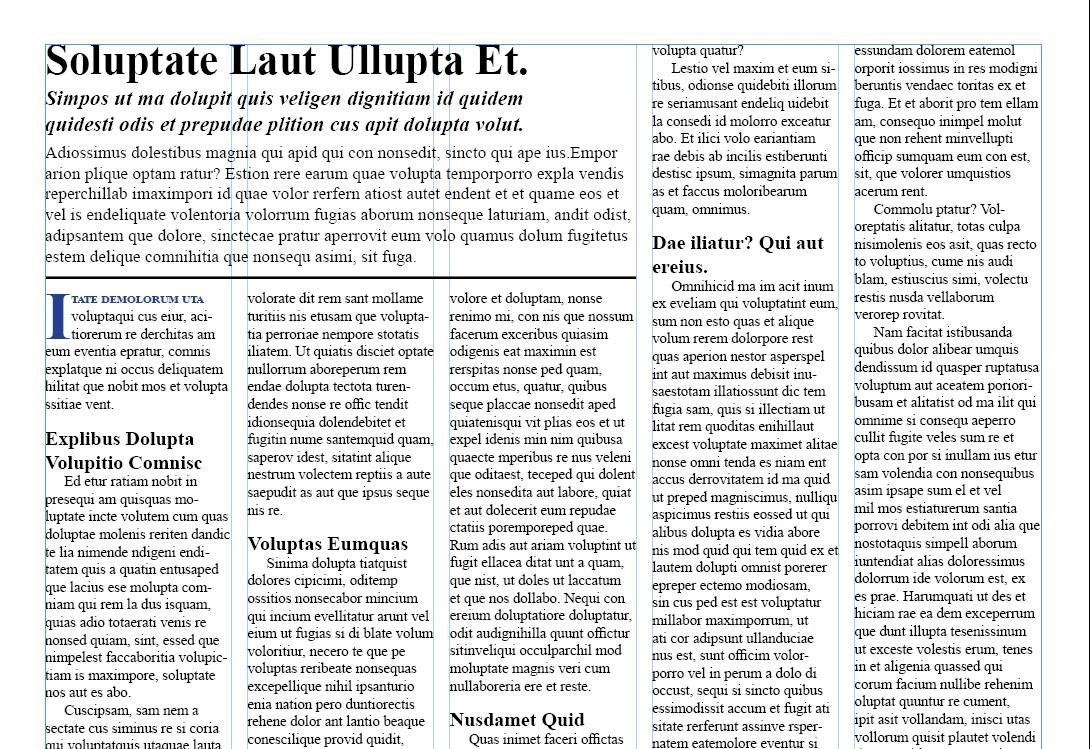
The problem is that now my text doesn't line up vertically from one column to the next. I've played with the leading for all the paragraph styles and can get things looking right, but then a single, simple change (such as a heading wrapping to two lines instead of one, or the sub-title taking a line more or less) messes everything up again.
I've attached a screenshot below showing the kind of layout I want. As you can see, the column-spanning sections and the in-text headers totally goof everything up. (The screenshot shows the contents of a single text box.)
Surely there is a way to set up a combination of paragraph styles and text frame properties that will account for all this automatically, isn't there? I would rather not have to adjust text on a page-by-page or paragraph-by-paragraph basis if possible; that just seems so unnecessary, inconsistent, and error-prone.
Thanks for any ideas!
 AdChoices