
gregd
Inspiring
February 15, 2024
Answered

How can I skip dialog boxes when using createOutlines()?

  • February 15, 2024
  • 3 replies
  • 636 views
var doc = app.activeDocument;
var currentPage = doc.pages[0];
var textFrames = currentPage.textFrames;
var textFrame = textFrames[0];
var myOutlines = textFrame.createOutlines(false);


Here is a short script, made from a larger script I'm working on. When I run it, I get this dialog box:
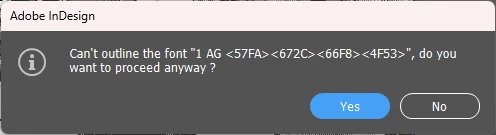


Selecting "Yes" creates outlines as you'd expect, there's no actual problem here. Selecting "No" results in this error dialog box:
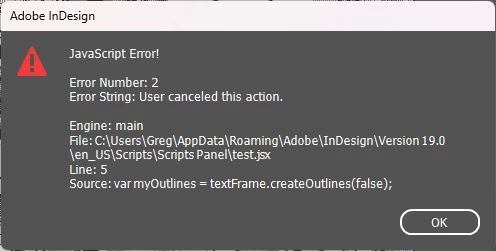


I believe I'm only getting this when trying to outline composite fonts. Putting the createOutlines() line inside a try/catch thing doesn't skip the first dialog box, but it does skip the second one (which means no outlines are created, which is not what I want).


How can I make the script automatically pick yes?

This topic has been closed for replies.
Correct answer Peter Kahrel

You can try setting the user-interaction level, which means that you bypass dialogs. You'll need a try/catch construct as well so that you can decide what to do with the error:

// Disable warnings
app.scriptPreferences.userInteractionLevel = 
  UserInteractionLevels.NEVER_INTERACT;

try {
  var myOutlines = app.activeDocument.pages[0].textFrames[0].createOutlines(false);
} catch (e) {
  // Do something to deal with the error
}

// Don't forget to reanable them
app.scriptPreferences.userInteractionLevel =
  UserInteractionLevels.INTERACT_WITH_ALL;


3 replies

Peter Kahrel
Community Expert
Peter KahrelCommunity ExpertCorrect answer
Community Expert
February 16, 2024

You can try setting the user-interaction level, which means that you bypass dialogs. You'll need a try/catch construct as well so that you can decide what to do with the error:

// Disable warnings
app.scriptPreferences.userInteractionLevel = 
  UserInteractionLevels.NEVER_INTERACT;

try {
  var myOutlines = app.activeDocument.pages[0].textFrames[0].createOutlines(false);
} catch (e) {
  // Do something to deal with the error
}

// Don't forget to reanable them
app.scriptPreferences.userInteractionLevel =
  UserInteractionLevels.INTERACT_WITH_ALL;


gregd
gregdAuthor
Inspiring
February 20, 2024

Thanks, this works even without the try/catch. InDesign seemingly just picks "Yes," presumably because it's the default option.

m1b
Community Expert
Community Expert
February 16, 2024

Hi @gregd, just echoing what @Willi Adelberger noted—are you sure that the outlining is working correctly (even after you click Yes, and testing on a good sample of composite glyphs)?


In terms of tackling the dialog—there is no Indesign-scripting-API way that I know of to click the button. You may be able to use a third-party utility, eg. AutoHotKey or KeyboardMaestro, but I do not have experience with those methods.

- Mark

Willi Adelberger
Community Expert
Community Expert
February 16, 2024

I am not a scripted. But I warn you, creating outlines in InDesign is a no-go as also objects will be missed. 
Do outline in Acrobat Pro without any danger.