

dublove
Legend
June 13, 2025
Answered

How can I use a script to determine if the last row of a table is really empty?

  • June 13, 2025
  • 1 reply
  • 370 views

Last time Peter Kahrel said that the empty row judgment will fail if the table overflows without displaying.
It does happen when I test it, any ideas?

The code below, I originally intended to add an empty row as the end of the table if there is no end of the table.

Now there is a problem.
Sometimes the end of the table already exists, but after running the script, it will still incorrectly add a blank line.
Sometimes the last row is not a blank row, but after running the script, the row with content is turned into the end of the table.


var cell = app.activeDocument.selection[0].parent;
var myTable = cell.parent;
if( myTable.rows[-1].cells.everyItem().contents!==""||myTable.rows[-1].rowTypes!==RowTypes.FOOTER_ROW){
  dupeLastRow(myTable);
}
    function dupeLastRow(p){
    myTable.rows.add(LocationOptions.AFTER, myTable.rows[-1]);
    }
    myFooterRow = myTable.rows[-1];
 

Correct answer m1b

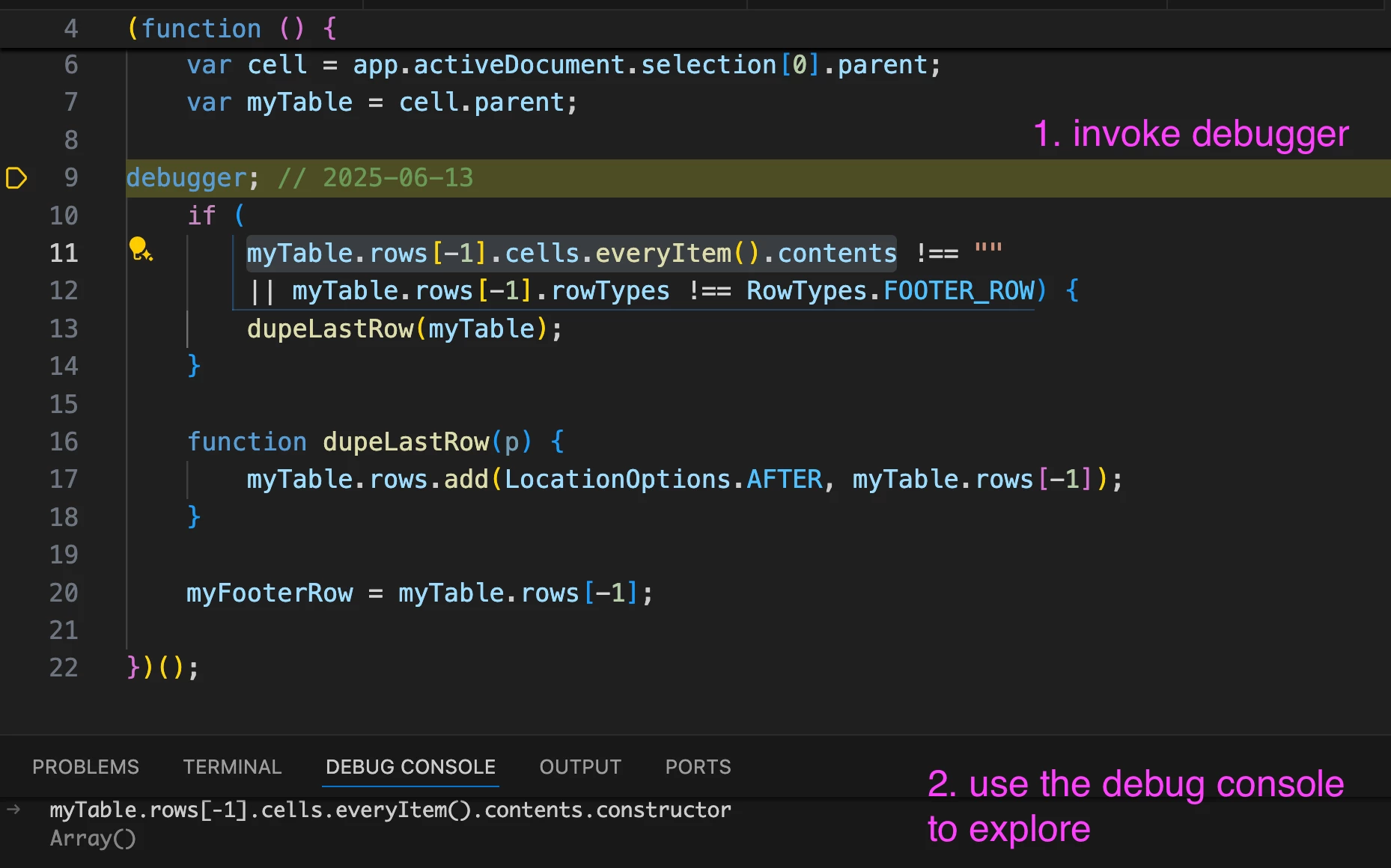
Hi @dublove, the problem here is that Cells.everyItem().contents returns an Array, not a String.


See this:


This is a screenshot of your code inside VSCode, using ExtendScript Debugger. I've invoked the debugger just before the "if" statement.

debugger;


Then I go to the Debug Console and type in some commands to interrogate my objects, in this case I enter:

myTable.rows[-1].cells.everyItem().contents.constructor

 And it shows me the result:

Array()


So this tells me why the if predicate isn't working (an Array is always not equal to a String).


You could try this:

if (
    myTable.rows[-1].cells.everyItem().contents.join('') !== ""
    || myTable.rows[-1].rowType !== RowTypes.FOOTER_ROW
)


Note also a typo in your second predicate.


One last thing, you mentioned overflowing. You can test for overflowing like this:

var lastCell = table.cells.lastItem();

if (0 === lastCell.texts[0].parentTextFrames.length)
    alert('Last row is overflowing.');
else
    alert('Last row is fine.');


Hope that helps.

- Mark

1 reply

m1b
Community Expert
m1bCommunity ExpertCorrect answer
Community Expert
June 13, 2025

Hi @dublove, the problem here is that Cells.everyItem().contents returns an Array, not a String.


See this:


This is a screenshot of your code inside VSCode, using ExtendScript Debugger. I've invoked the debugger just before the "if" statement.

debugger;


Then I go to the Debug Console and type in some commands to interrogate my objects, in this case I enter:

myTable.rows[-1].cells.everyItem().contents.constructor

 And it shows me the result:

Array()


So this tells me why the if predicate isn't working (an Array is always not equal to a String).


You could try this:

if (
    myTable.rows[-1].cells.everyItem().contents.join('') !== ""
    || myTable.rows[-1].rowType !== RowTypes.FOOTER_ROW
)


Note also a typo in your second predicate.


One last thing, you mentioned overflowing. You can test for overflowing like this:

var lastCell = table.cells.lastItem();

if (0 === lastCell.texts[0].parentTextFrames.length)
    alert('Last row is overflowing.');
else
    alert('Last row is fine.');


Hope that helps.

- Mark

dublove
dubloveAuthor
Legend
June 13, 2025

Hi m1b. 

It seems to be working.

Thank you very much.

I'm looking for where the DEBUG CONSOLE window opens from
......
I'll look into it when I get a chance.
Seems like a lot of work.


As for detecting form overflow only keep it as a backup.
The script is usually run with an overflow, it's not possible to go ahead and expand the unscheduled.

I'm just worried that sometimes I'll get an error if the form has an overflow, and I don't know when this danger will happen, but hopefully it won't.


I'm guessing Peter Kahrel is talking about cells overflowing, not tables not lined up overflowing.