

dublove
Legend
March 30, 2026
Answered

How can I use a script to retrieve the text box below an image?

  • March 30, 2026
  • 2 replies
  • 46 views

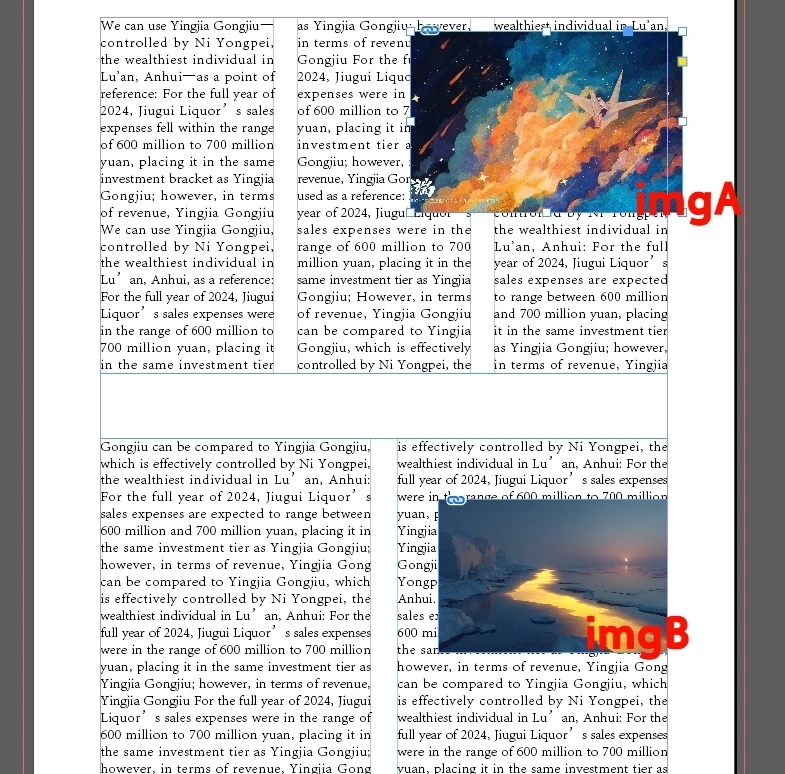
My layout has only one column.
However, the text boxes are split into two or three columns.
I have currently selected only the image “imgA”; how can I retrieve the text box below it?
I want to use a script to determine how many columns the text boxes are split into.

Thank you.
 

    Correct answer rob day

    You would have to select the image (or image frame), and the target text frame.

    2 replies

    rob day
    Community Expert
    rob dayCommunity ExpertCorrect answer
    Community Expert
    March 30, 2026

    You would have to select the image (or image frame), and the target text frame.

    dublove
    dubloveAuthor
    Legend
    March 30, 2026

    @rob day 

    Yes, you can select them at the same time and then retrieve the text box and image separately.
    But in practice, it always feels a bit odd. It seems like there’s an extra, unnecessary step.
    Another approach is to assign the value to the paragraph style name, which seems to work as well.

    Community Expert
    March 30, 2026

    You image don’t seem to be anchored into the textframe below it so there is no direct relation between them. Now the only way I can think of is a logic to define if the coordinates of both these boxes overlap

    -Manan
    dublove
    dubloveAuthor
    Legend
    March 30, 2026

    @Manan Joshi 

    Is it possible to determine this based on the object in the background layer of the image?