

dublove
Legend
July 29, 2025
Answered

How can overflow be automatically displayed when a text box is moved into the layout?

  • July 29, 2025
  • 2 replies
  • 285 views

After moving horizontally into the layout, if sb[2] exceeds the bottom edge, overflow is displayed.
This is instead of expanding, as the text may be very long.

sel[j].visibleBounds = [sb[0], lcb, sb[2], rcb];
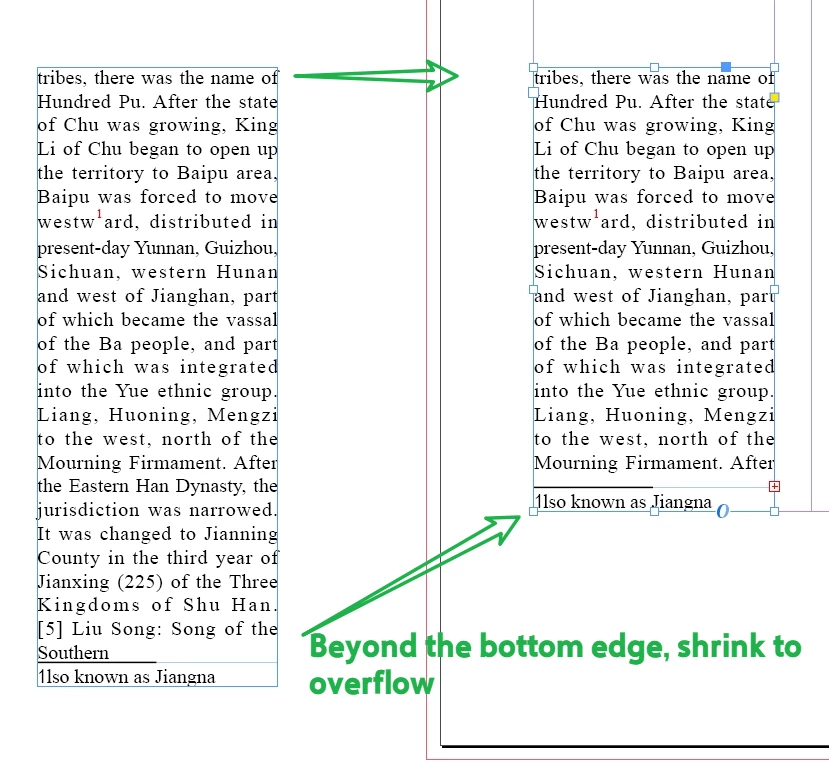
 

Correct answer dublove

This seems feasible:

 
var pb = sel[j].parentPage.bounds;
var bm = pp.marginPreferences.bottom.
. . . . . .
sel[j].visibleBounds = [sb[0], lcb, pb[2] - bm, rcb];
sel[j].fit(FitOptions.FILL_PROPORTIONALLY);

//sel[j].fit(FitOptions.FRAME_TO_CONTENT);

2 replies

rob day
Community Expert
Community Expert
July 29, 2025

You don’t know how much content is oveflowing, so you would have to fit the frame to the content


app.activeDocument.selection[0].fit(FitOptions.FRAME_TO_CONTENT)


dublove
dubloveAuthor
Legend
July 30, 2025

After FitOptions.FRAME_TO_CONTENT, the text box will exceed the page margin.

I want the textFrame display a red “+” with the text “overflow text” when the sb[2]  exceeds the bottom edge.


I don't know what mechanism causes it to go all the way to the bottom of the interface.
Is it possible to stop the expansion at the bottom of the page?

m1b
Community Expert
Community Expert
July 29, 2025

What's your question @dublove ?

dublove
dubloveAuthor
Legend
July 29, 2025

I am researching text box adaptation columns, but the text box is too long, and I don't want it to exceed the page layout.

m1b
Community Expert
Community Expert
July 29, 2025

So what's your question?