kdprinter
Participating Frequently
March 15, 2018
Question

How did my Graphic Designer do this with Excel into InDesign?

  • March 15, 2018
  • 3 replies
  • 851 views

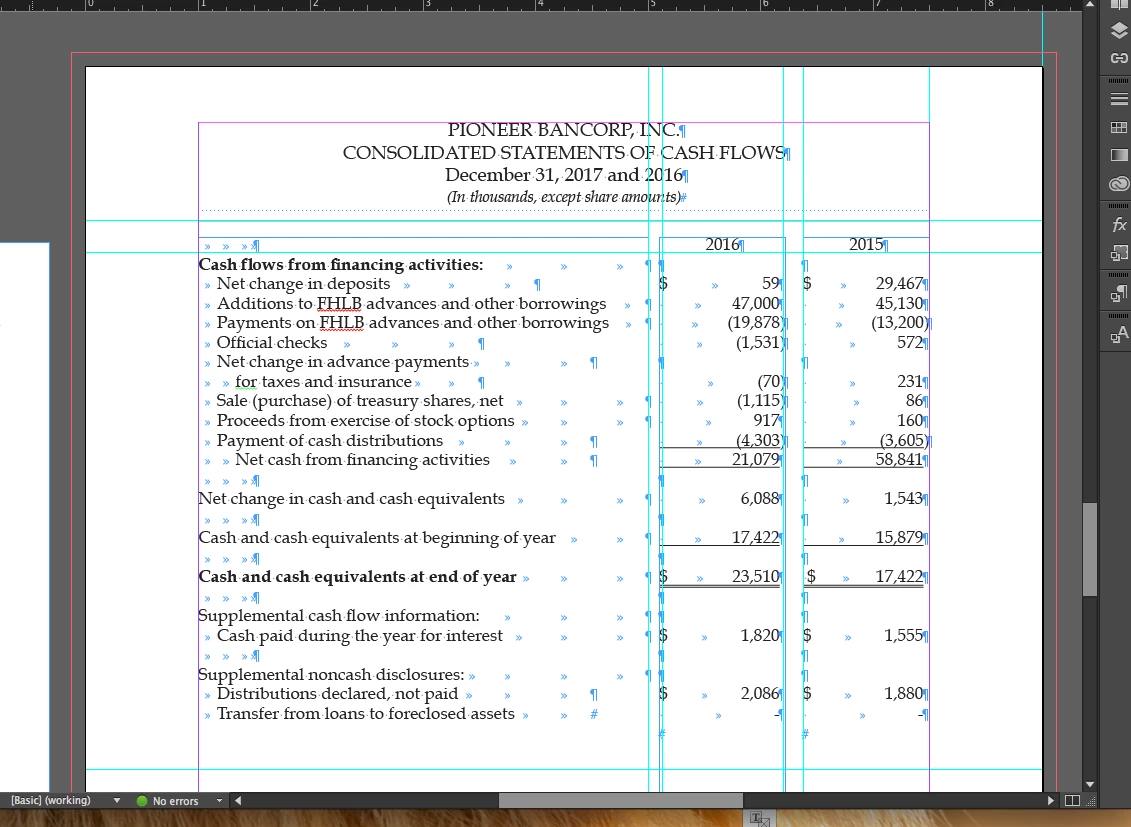
I need help, advice. I have a client that uses Excl. I thought I could make a pdf of the file and be good to go placing in InDesign.

They want more. Previously my Graphic Designer had formatted type and placed underscored rules that Excel can't do.

I have attached a screen shot.

Does anyone have suggestions - I am on a deadline.

How did he do this?
    This topic has been closed for replies.

    3 replies

    jane-e
    Community Expert
    Community Expert
    March 16, 2018

    kdprinter  wrote

    Previously my Graphic Designer had formatted type and placed underscored rules that Excel can't do.

    How did he do this?

    Q: How did he do this?

    A:  Badly

    Using three frames with multiple tabs is not efficient or a best practice. Better would have be either a table in InDesign or a linked table from Excel. If it were a table in InDesign or Excel, the lines could be attached to the bottom of a cell. He spent much more time formatting it this way than if he had done it efficiently, and I hope you aren't paying by the hour.

    How did you lose the work? Can it be recovered? Can we help with that?

    kdprinter
    kdprinterAuthor
    Participating Frequently
    March 16, 2018

    I apologize not being clear on what I mean as rules.

    I mean double lines - under totals.

    Client wants those move up closer to the number itself

    Legend
    March 16, 2018

    kdprinter  wrote

    I mean double lines - under totals.

    Client wants those move up closer to the number itself

    This could be easily achieved using an InDesign table with the text aligned to the bottom of the cells, with the lower cell padding reduced. (highlighted cell to show the settings, other one to show the result)

    hammer0909
    Community Expert
    Community Expert
    March 16, 2018

    It's hard to tell from your screen shot. They could have used a Rule Below as Laubender has said. You'll find this by clicking in the text and pressing ctrl+alt+J (Windows) or Cmd+Option+J (Mac). They could have also achieved this using the underline format. Select the text and look in your character formatting to see if the underline button is enabled. If it is, option/alt click on the button to see the properties.

    kdprinter
    kdprinterAuthor
    Participating Frequently
    March 15, 2018

    No need for an answer.

    I lost the work.

    Legend
    March 15, 2018

    Out of interest: surely just lots of cells, with a few cells having rules above/below.

    Community Expert
    March 16, 2018

    I don't see any table cells here, just three text frames side by side.
    The formatting could be a paragraph property like Rule below.

    Regards,
    Uwe