
Participant
February 26, 2023
Question

How do a remove the extra lines at the end of a page. in InDesign?

  • February 26, 2023
  • 2 replies
  • 1210 views

I am working on a large manuscript. Several places I see extra lines at the bottom of a page that should flow to the next sentence instead of jumping
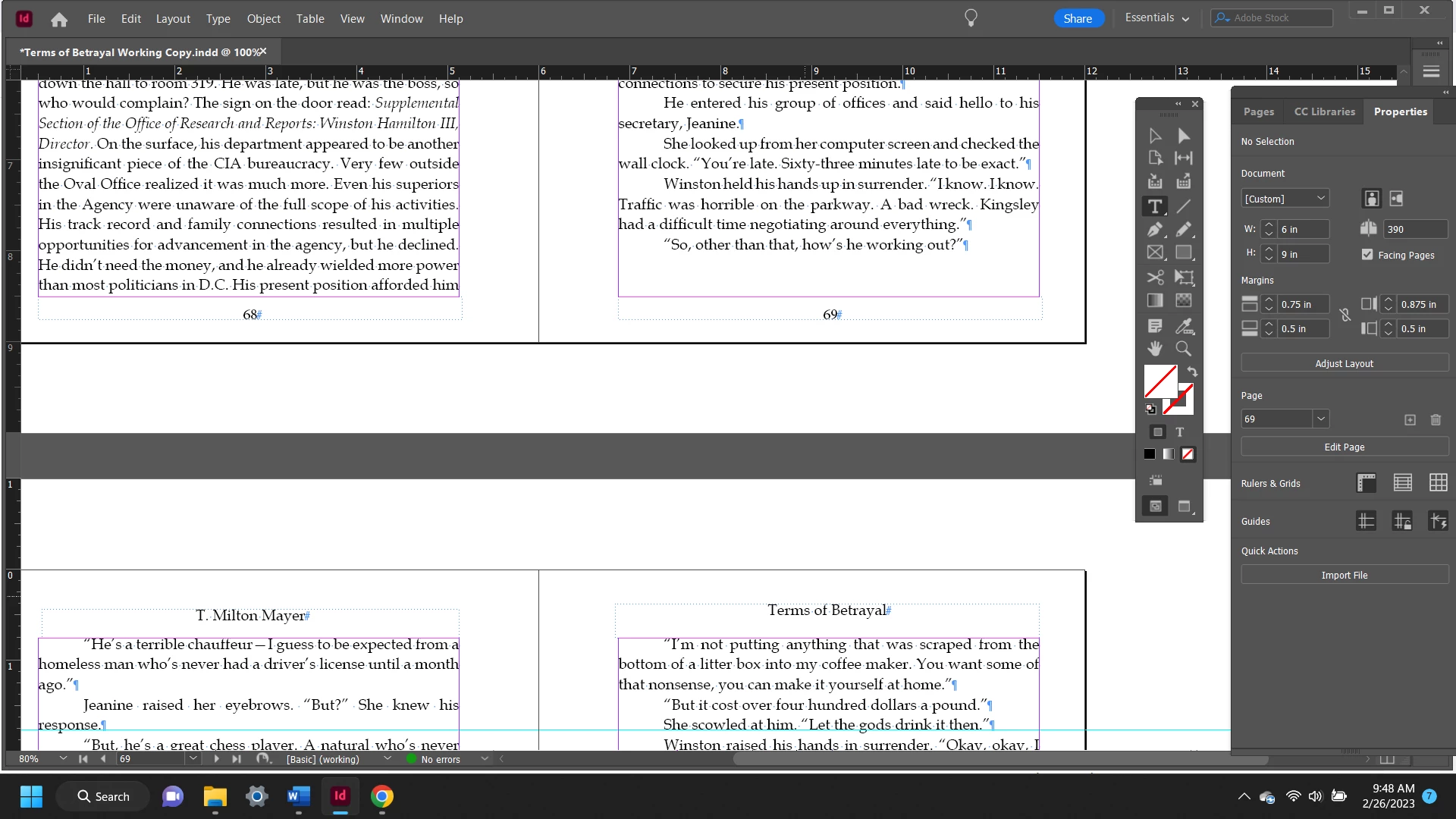
 

to a new page. Help please.  

This topic has been closed for replies.

2 replies

Peter Spier
Community Expert
Community Expert
February 26, 2023

This is one of the challenges of copyfitting in a long document. Indeed it looks like keep options at play, and the only way around it is either to edit the text or adjust the tracking to either move "ago" up onto the prvous line, shortening the paragraph to two lines which will fit, or more likely to do it in what looks like a very long paragraph on page 68 where you may be able to select the entire paragraph and use the keyboard shorcut Ctrl + Alt + Backspace to reduce the width of the word spaces without changing anything else and lose a line there. Changing the Justification settings to tighten things up in general is also an option, but I prefer just to track spaces, myself.

Keep in mind that this sort of copy fitting is best left to the final stage of layout. Edits to the text will throw things out of whack, and you need to work from front to back becuse what you do one page affects all the pages following.

Community Expert
February 26, 2023

That's sound advice and I would do the same - you could probably get 'ago' back to come back to make 2 lines for that text with a bit of tracking adjustment.

Scott Falkner
Community Expert
Community Expert
February 27, 2023

I usually create at least three versions of my body copy pargraph style, one normal, one loose, one tight. The loose version has stricter hyphenation and looser spacing. The tight version has more aggresive hyphenation and tighter spacing. When I want to clean up gaps like these I try apply the loose or tight versions to paragraphs to see if that sucks up a line or adds a line. It takes time. If there are lots of styles based on body copy (1st paragraph in a chapter, bullets, etc.) I might need tight a loose variations for each of those.


It's time consuming, but necessary.


Edit: Example attached.

Community Expert
February 26, 2023

https://creativepro.com/keep-options-interact/#:~:text=In%20the%20Keep%20Options%20dialog,is%20your%20widow%2Forphan%20control.


Check the Keep Options

It looks like it's designed that way so you don't have widows/orphans at bottom/top of pages. 


Participant
February 26, 2023

Thank you so much. I do use the Keep Options to keep a minimum of two pages
on a page at the end of a chapter.
But in this case, this is right in the middle of a chapter. Can I highlight
the lines in question ONLY and use the Keep Options to Keep with Previous
and not effect the rest of the manuscript?


Community Expert
February 26, 2023

Yes you can change the keep options for any paragraphs at any time.