


Participant
January 25, 2024
Answered

How do I add multiple lines of text / Paragraph to a Combo Box in InDesign?

  • January 25, 2024
  • 1 reply
  • 407 views

Hi guys,


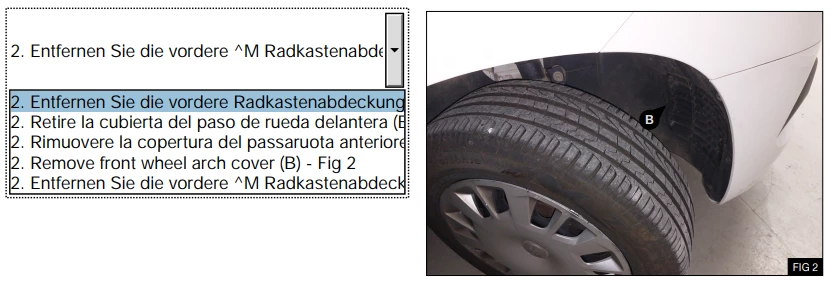
I'm looking to include a 'Combo Box' in a Instruction manual for work to make an inclusive, multilingual user guide. However I've come across a feature that may not yet be available? I want to be able to include multiple lines of text that work as a paragraph for each 'Item' i put in my 'Combo Box'.


I've included a picture below with what I currently have, but as you can see, the user would be unable to see all of the text.


Is this possible? I can't work it out. Thanks in advance for any help given!


This topic has been closed for replies.
Correct answer Barb Binder

Hi @_thomaskinner:


InDesign is limited in its form field controls. Anyone creating advanced forms might choose to start in InDesign, but will need add the more advanced form field features once the file is in Adobe Acrobat.


In terms of multi line combo box entries, see https://community.adobe.com/t5/acrobat-discussions/combobox-multiline-options-acrobat-pro-dc/td-p/10346426.


If you have additional questions, you should be able to get help on the Acrobat forum:
https://community.adobe.com/t5/acrobat/ct-p/ct-acrobat?page=1&sort=latest_replies&lang=all&tabid=all


~Barb

1 reply

Barb Binder
Community Expert
Barb BinderCommunity ExpertCorrect answer
Community Expert
January 25, 2024

Hi @_thomaskinner:


InDesign is limited in its form field controls. Anyone creating advanced forms might choose to start in InDesign, but will need add the more advanced form field features once the file is in Adobe Acrobat.


In terms of multi line combo box entries, see https://community.adobe.com/t5/acrobat-discussions/combobox-multiline-options-acrobat-pro-dc/td-p/10346426.


If you have additional questions, you should be able to get help on the Acrobat forum:
https://community.adobe.com/t5/acrobat/ct-p/ct-acrobat?page=1&sort=latest_replies&lang=all&tabid=all


~Barb

~Barb at Rocky Mountain Training
Participant
January 25, 2024

Thanks for your help Barb, I'll check it out!
