

Known Participant
August 6, 2024
Question

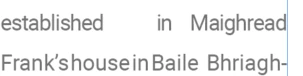
How do I change huge spacing in this sentence in this paragraph in InDesign?
  • August 6, 2024
  • 2 replies
  • 1198 views


<Title renamed by moderator>

This topic has been closed for replies.

2 replies

Community Expert
August 14, 2024

Hi @James3669094303ct ,

thank you for the sample InDesign document.


Alright, I had a missing font error about Roboto font when I opened your sample InDesign document and activated the font through Adobe Fonts. That gave the composition engine something like a "kick" and the composition turned out this way:


So the question is what kind of Roboto font you are currently using. If one from Google Fonts I'd test an activated Roboto from Adobe Fonts. But for that test you have to uninstall the Roboto font files from your system.


Regards,
Uwe Laubender
( Adobe Community Expert )

Robert at ID-Tasker
Legend
August 6, 2024

By turning on hyphenation for the applied ParaStyle - or locally for the paragraph. 


https://helpx.adobe.com/uk/indesign/using/text-composition.html


Can you turn on "Show hidden characters" and post your screenshot again? It looks like you have some extra spaces? 


Known Participant
August 14, 2024

No hidden characters are present

Robert at ID-Tasker
Legend
August 14, 2024
quote

No hidden characters are present


By @James3669094303ct


You haven't turned ON "Show Hidden Characters".
