Known Participant
January 14, 2025
Question

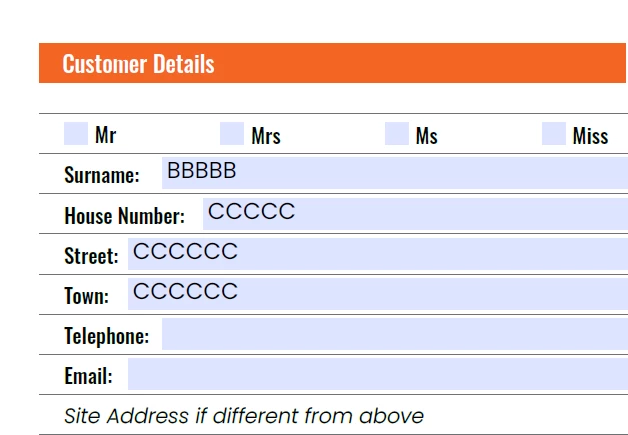
How do I change the baseline shift in a text form field when exported to a PDF?
  • January 14, 2025
  • 3 replies
  • 408 views

How do I change the baseline shift in a text form field when exported to a PDF?

 

3 replies

TᴀW
Legend
January 14, 2025

You can't change the baseline shift, either in InDesign or in Acrobat. (In Acrobat, if the field is set to a rich-text field, there is a way to do this).

Theoretically, text in a form field in Acrobat is supposed to be centered vertically. In practice, it depends on some property that is defined in the font itself (I don't know if I ever managed to figure out which), so what actually happens in Acrobat is a little font-dependant.

If you want the field labels (Surname, House Number, etc.) to line up perfectly with the editable field itself, you might consider turning the labels into text fields in InDesign as well, just make them non-editable (i.e. check the "Read Only" checkbox).

Visit www.id-extras.com for powerful InDesign scripts that save hours of work — automation, batch tools, and workflow boosters for serious designers.
Robert at ID-Tasker
Legend
January 14, 2025

@James3669094303ct


Unfortunately, FormField Objects - the whole Class - do not have this text property - baseline shift.


They are descendants of the PageItem superclass - so no "text properties" at all.


Luke Jennings3
Community Expert
Community Expert
January 14, 2025

It looks like your form field properties are set to "Multi-line" this will align the type to the top of the form field, if you turn off Multi-line, it will align to the center of the box. Edit- the baseline of the type does appear to be a bit random when the form boxes are tight, like your example. Also, you can group select the form fields in Acrobat and move them as a group (Tools> Prepare forms). Are you asking about adding an image to a pdf, or having the user add an image using a form field? both are possible in Acrobat.

Eric Dumas
Community Expert
Community Expert
January 14, 2025

Hi,

Can you confirm the steps you took to create this and if you have Adobe Acrobat (or others like Adobe Forms ex. LifeCycle) to edit the fields?

Known Participant
January 14, 2025

Hi,

I created a text field from the Buttons and forms menu, is it possible to add an image field in adobe acrobat?