
Participant
September 27, 2022
Question

How do I change the position of my pages I'm designing so they are stacked and not offset?

  • September 27, 2022
  • 3 replies
  • 259 views

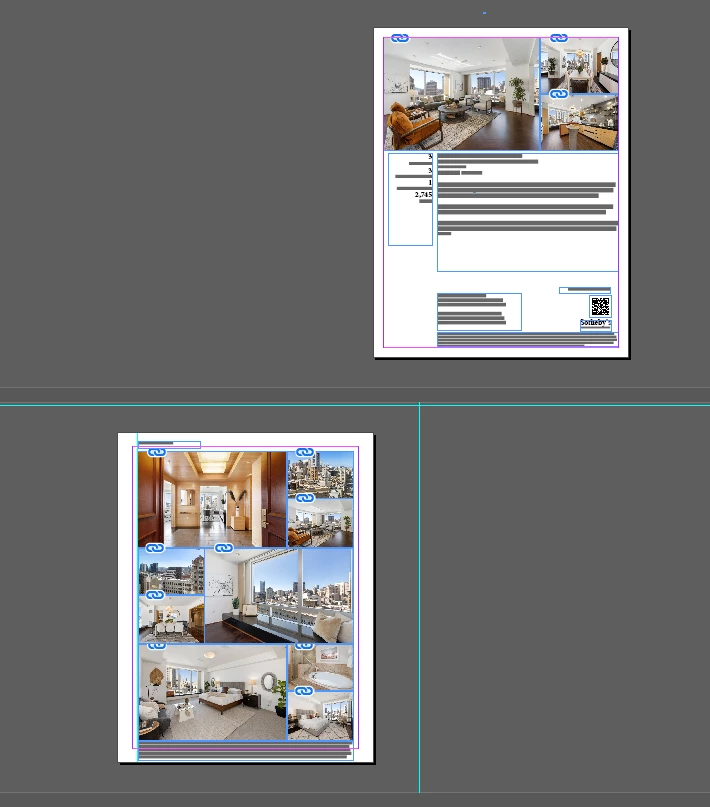
This is how my pages are currently positioned. I want these pages lined up in a column so i can scroll more easily to the pages below. Is there a setting to change the postion of the pages and is there a default setting to change for new documents I create? Thanks


This topic has been closed for replies.

3 replies

Community Expert
September 27, 2022

Hi @defaultffny6uvqk1ul ,

I'm not sure what you are showing in your screenshot.

What I'm missing is a visible pasteboard area around the pages.


Please turn to Normal View and show the document pages in about 10% zoom. Show the whole layout window. Also make sure that the minimum values for the pasteboard are not 0. Check that in InDesign's Preferences panel.


Regards,
Uwe Laubender
( Adobe Community Expert )

Barb Binder
Community Expert
Community Expert
September 27, 2022

It appears that you are working with a facing pages enabled, with a right opening page and a left second page—so that's how they are displayed. (You must have added the green lines?) Single-sided documents display one under the other. 


~Barb


~Barb at Rocky Mountain Training
James Gifford—NitroPress
Legend
September 27, 2022

Turn off Facing Pages. This is, however, a structural change to the document, not just a setting for how they are ordered in the Pages palette. I don't know of any way to make the display linear (horizontal or vertical) with Facing Pages enabled.


You could also insert a blank first page so that your other pages are lined up in pairs. Just remember not to include it — or just delete it — when you print or export.