karthikS
Inspiring
September 19, 2019
Question

How do I crop/remove an extra white space around on image in InDesign script?

  • September 19, 2019
  • 3 replies
  • 3634 views

Hi All,


How do I crop/remove an extra white space around on image in InDesign script? Please see below your reference.
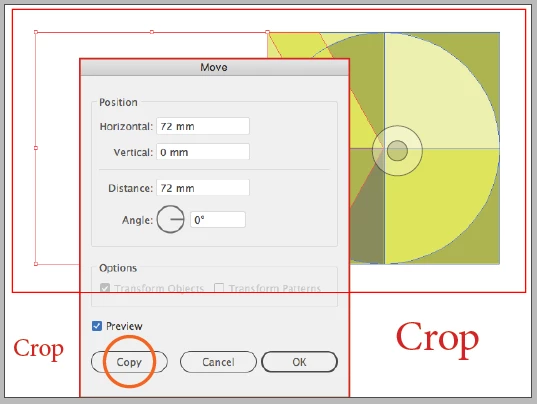


This is possible or not? Please suggest to me, friends


Thanks,

karthik S


This topic has been closed for replies.

3 replies

karthikS
karthikSAuthor
Inspiring
September 19, 2019

One more Thanks! Perter Kahrel


I want to like crop image(this is group image) below: Placed screenshot for your reference.


Thanks, 

Karthik S

Peter Kahrel
Community Expert
Community Expert
September 19, 2019
You didn't answer my question. If you're looking for someone to write a script for you, you should state that clearly. And you should also state clearly what exactly you want: from your screen shot it's not clear how much should be taken off.
Robert at ID-Tasker
Legend
November 7, 2022

I'm pretty sure he / she is looking for an automatic way to crop white space 😉 like you can do in Photoshop when you select around the object 😉 but of course is not possible.


karthikS
karthikSAuthor
Inspiring
September 19, 2019

Thanks! Perter Kahrel


Also, my main concern, I need to crop for the left and right white space. Please see my screenshot (Please see "Crop" bottom of the left and right text)  this type of cropping, I want to do.


This is possible?


Thanks in Advance,

Karthik S


Peter Kahrel
Community Expert
Community Expert
September 19, 2019

Well, sure. Do you know geometricBounds? They are the top, left, bottom and right of a frame, in that order. So if you want to crop left and right, you change the second (left) and fourth (right) values:


app.selection[0].geometricBounds = [gb, gb[1]+6, gb[2], gb[3]-6];

Peter Kahrel
Community Expert
Community Expert
September 19, 2019

An image is a graphic file inside a rectangle. You crop the image by changing the geometric bounds of the rectangle. For example, to crop an image by 6 millimeters on all sides, do this (assuming your measurement units are millimeters):


gb = app.selection[0].geometricBounds;
app.selection[0].geometricBounds = [gb[0]+6, gb[1]+6, gb[2]-6, gb[3]-6];


P.

Known Participant
November 7, 2022

Hi @Peter Kahrel 

Totally agree with the solution that you have provide , please help me with script 

I have placed imagefile in rectangular frame having bounds (x=800.524 mm, y=11.194 mm,w=200.003 mm,H=79.153 mm)

Now i want to crop my image (by changing geometric bound of rectangular frame having bound (x=800.524 mm, y=11.194 mm,w=33.35 mm,H=79.153 mm)


Thanks in advance !!

Known Participant
November 7, 2022