

dublove
Legend
October 26, 2025
Answered

How do I enable text wrapping and set non-printing?

  • October 26, 2025
  • 3 replies
  • 215 views

Couldn't find any examples.

Looked through the developer documentation, but I don't know how to use it.

https://www.indesignjs.de/extendscriptAPI/indesign-latest/#ObjectStyle.html


Is this correct? It doesn't seem to work. It also shows a syntax error for nonprinting.

objectStyle.textWrapPreferences.properties = {
nonprinting: true,
}
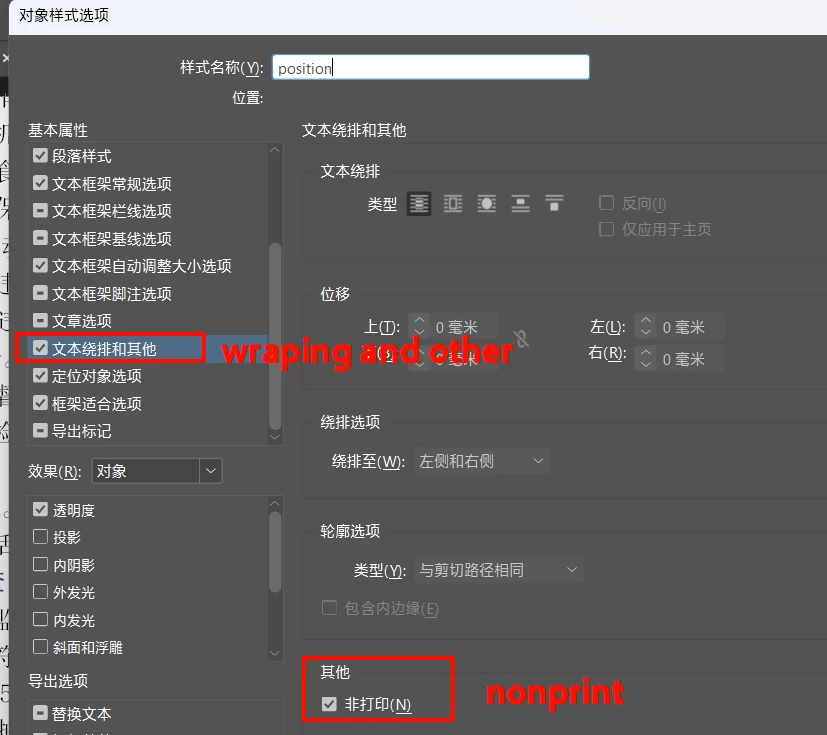
Correct answer dublove

It seems to be this:
objectStyle.nonprinting = true;

3 replies

rob day
Community Expert
Community Expert
October 26, 2025

There is no nonprinting property is objectStyle.textWrapPreferences


https://www.indesignjs.de/extendscriptAPI/indesign-latest/#TextWrapPreference.html


You can set in on a pageItem:


https://www.indesignjs.de/extendscriptAPI/indesign-latest/#PageItem.html


If you do a search for nonprinting in the API docs, you’ll get a list of objects that have the nonprinting property:


dublove
dubloveAuthor
Legend
October 27, 2025

Hi rob day.

I need to add nonprinting to the object style.
I don't know how to add it to pageItem.

The following works:
objectStyle.nonprinting = true;

rob day
Community Expert
Community Expert
October 27, 2025

I don't know how to add it to pageItem.


For a pageItem it would be (nonprinting page items are hidden when Overprint/Separation Preview is turned on):


var pi = app.documents[0].selection[0]
pi.nonprinting = true
$.writeln(pi)
//returns the selected object


dublove
dubloveAuthorCorrect answer
Legend
October 26, 2025

It seems to be this:
objectStyle.nonprinting = true;

Inspiring
October 26, 2025

This is a Japanese site, but
http://indesign.cs5.xyz/dom/about.html
is also worth checking out.

dublove
dubloveAuthor
Legend
October 26, 2025

Found this switch, but couldn't locate the non-printing setting.
enableTextWrapAndOthers: true,