
Known Participant
August 12, 2025
Question

How do I fix this-Please be EXPLICIT
  • August 12, 2025
  • 2 replies
  • 432 views

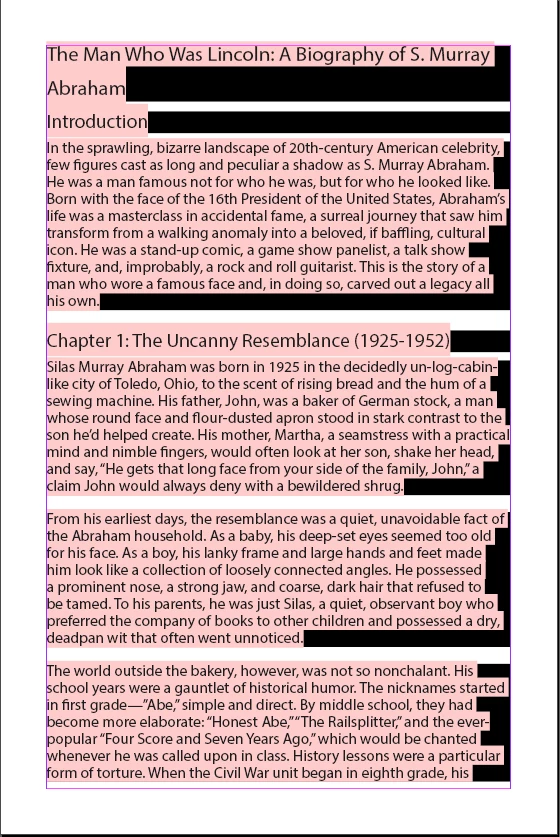
I know there is a problem with fonts missing, but how do I fix this?  If I want to install the missing fonts, will that work?  If I want to substitute fonts, what exactky do I do- Step by step,

TIA for any help.  I am admittedly lost.


2 replies

Bill Silbert
Community Expert
Community Expert
August 12, 2025

The pink color simply means that the font is not open on your computer. If the font in question is one that is available as an Adobe Font then you can go into your Creative Cloud Desktop app go to the Home Section and click on Adobe Fonts in the list on the right. If the font shows as installed there but is not opening then try signing out of your Adobe Account in the Desktop app and then sign right back in again. This simple act can "wakeup" fonts that are not automatically loading. If the font that you're missing does not show as installed there then click on the "Browse More Fonts" in the upper right. Doing this will take you to the Adobe Fonts section on Adobe's website. Sign in there with your Adobe ID and then do a search for the font that you need. If it is available then you can download it to your computer. Go back to the desktop app and click on the option there to Install the whole family of that font. If the font is not available as an Adobe Font and you do possess a licensed version of the font then in terms of opening the font you will need to provide details as to exactly what operating system you are using and whether you have any font utilities installed. Installing fonts is an entirely different process on a Macintosh vs a PC. We will need as many details as possible to guide you in opening non Adobe Fonts.

Dave Creamer of IDEAS
Community Expert
Community Expert
August 12, 2025

@Bill Silbert It looks like we posted at the same time. I would instruct the OP to use the Document Fonts folder and put the font in it. That way, depending on where the font came from, it can't damage the OS. 


David Creamer: Community Expert (ACI and ACE 1995-2023)
Bill Silbert
Community Expert
Community Expert
August 12, 2025

I would certainly recommend that, Dave, if the OP is on a Mac. I personally am not familiar enough with Windows to make a personal recommendation for font installation if they're on a PC.

Mike Witherell
Community Expert
Community Expert
August 12, 2025

Hi Geo.

Type > Find/Replace Font will help you see the name of the missing fonts.

You should find them at fonts.adobe.com and activate them/install them by clicking the big activate family button in that webpage. That might get you back in business. 

Don't change the typefaces to other typefaces you have unless you are intending to change the design.

Mike Witherell
Dave Creamer of IDEAS
Community Expert
Community Expert
August 12, 2025

If it's NOT available from Adobe, you would need to install it. There are a couple of ways to do it depending on your needs. 

Report back after trying @Mike Witherell suggestion about Adobe Fonts and we can go from there.


David Creamer: Community Expert (ACI and ACE 1995-2023)