

rachel.l.courtney
Participating Frequently
June 3, 2026
Answered

How do I get Read Aloud to work correctly in Acrobat?

  • June 3, 2026
  • 3 replies
  • 57 views


I’ve been working on making an ADA Compliant PDF for weeks. Everything is great except for the read order specifically in table headers. Accessibility Tags are in the correct order. The Order is correct. 

Specifically the table reads: MCLG or, MCL or, Detected in Your, Range, Range, Sample, Contaminants, Low, High, Date, Violation, Typical Source
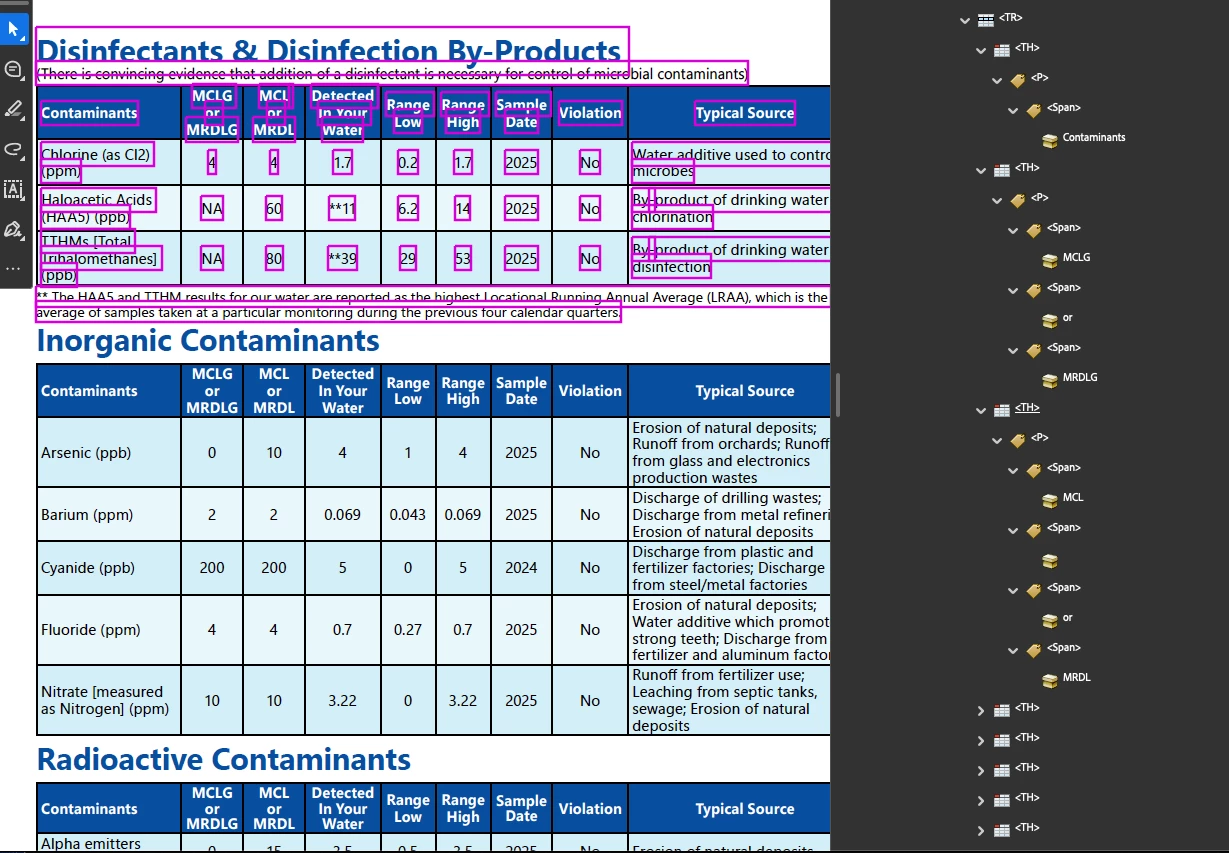
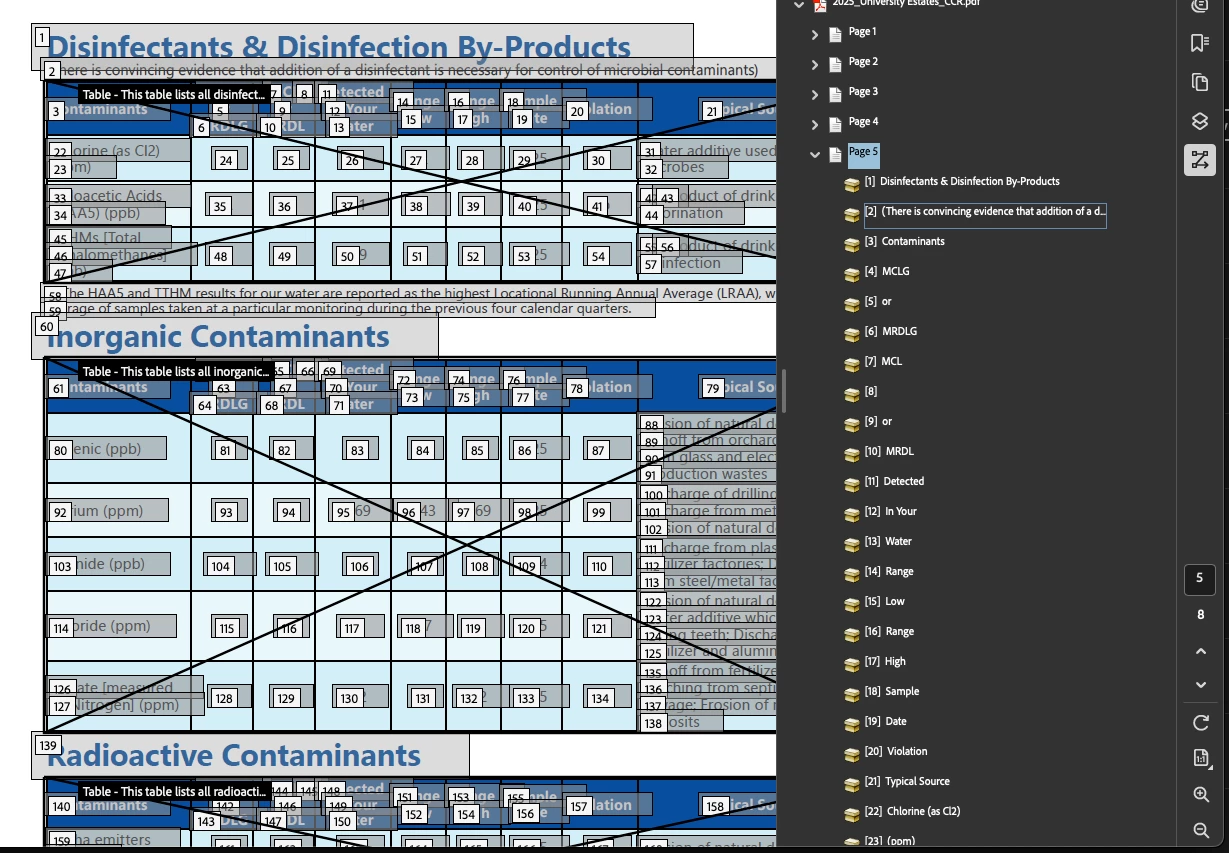
Accessibility Tags are in the correct order
Order is Correct

Somehow I get into a phone call with Adobe. 


Wednesday, May 27

Goal is to get Acrobat to read a table header aloud in the correct order.


Spent 1 hour 15 minutes with Adobe while they controlled my computer to get a table to Read Aloud correctly. They use Automatically Tag PDF (autotag) on the 8-page document. I follow the directions to autotag the document which deletes all of my indesign alt tags. There are several other accessibility errors after autotagging the document that weren't there prior to the "fix."

Adobe suggests:

  • Export the pdf from acrobat as a post script file, then put it in distiller and try that. This is not a solution for my 8-page documents, nor my 200-page documents.
  • Purchase Acrobat Studio because Acrobat AI Assistant can help solve this problem.

Adobe emails instructions to autotag my pdf and closes my case.

Case Closed


Thursday, May 28


I am taking the above solution seriously. I need Read Aloud to work, so my new problem is: Is there a way to make it so that when I Automatically tab PDF it doesn’t delete the tags I add in my Indesign file?

Adobe calls to look at my document for 50 minutes and says “no. Using Automatically tag PDF will always erase your tags from InDesign.”

Adobe suggests:

  • Every pdf you use, you should save as a copy, then work on it. 
  • Open the page in Illustrator and combine those three lines together and then it'll work 
  • Purchase Acrobat Studio because Acrobat AI Assistant can help solve this problem.

They ask me to send it to them so they can fix it on their end themselves. 


Tuesday, June 2

Attempt #4

Back to the original goal: Get Acrobat to read a table header aloud in the correct order.

Adobe sends email and 4 pages of document that they fixed. Two of them had nothing wrong at the start. One page is not fixed.

The solution to get the Read Aloud feature to read across the header column is to make all of the text fit in one line. 

Adobe suggests:

  • Using Illustrator for the tables instead of InDesign.
  • Designing the table as above, opening a PDF. Copying the table from one PDF and pasting to another. (below is a photo of them showing me how to do that.)
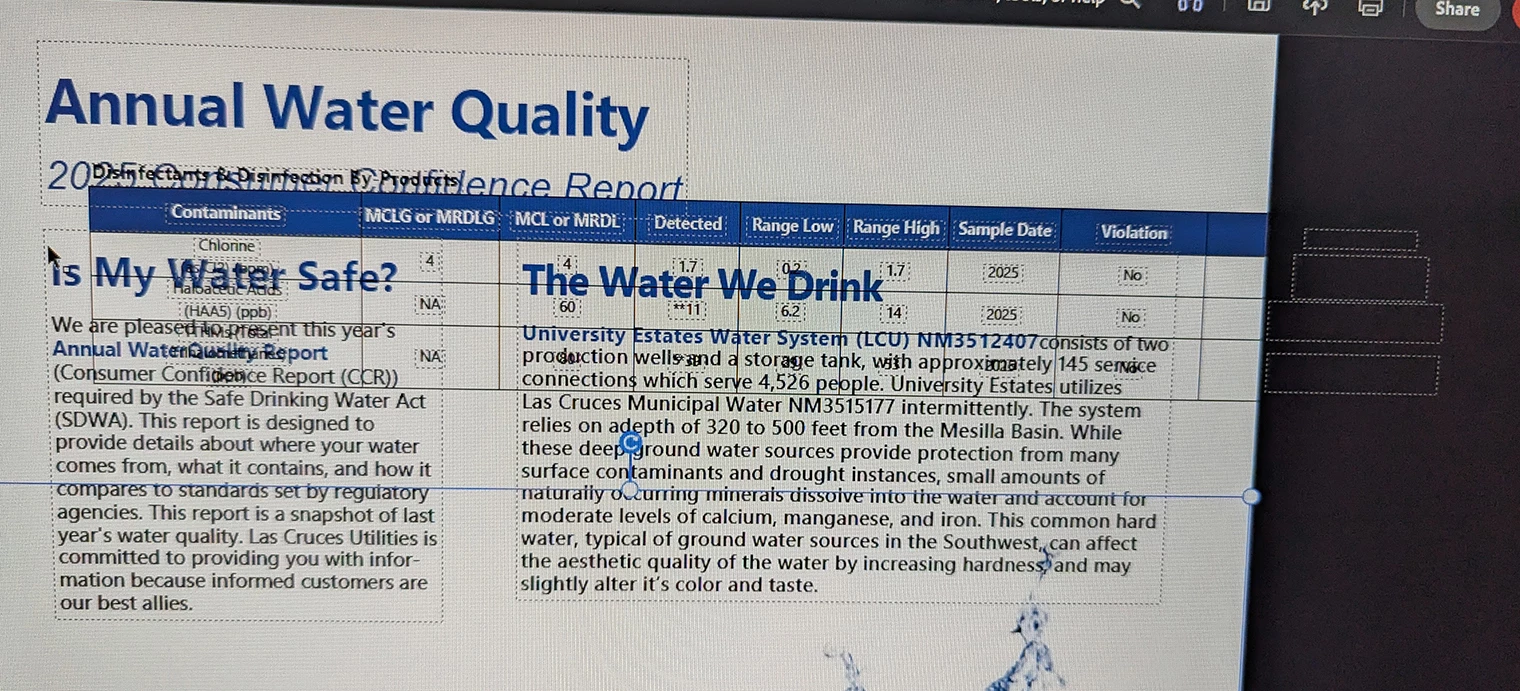
    Copy and paste your table from one PDF to another


  • Open the page in Illustrator and combine those three lines (the ones in a table that take up several rows) together and then it'll work 
  • Purchase Acrobat Studio because Acrobat AI Assistant can help solve this problem.

I am told that this is because my document isn’t PDF’d correctly and so I ask to speak to someone who can show me how to do that. I am transferred to an InDesign expert. He says I did it right and that it’s an Acrobat problem. (15 minutes.)

Transferred back to the Acrobat team.

This session is spent walking me through the steps of accessing Read Aloud. It takes about 10 minutes to turn it on and off and see that it isn’t working. (We aren’t going into odd or secret menus.) 

Adobe suggests:

  • Disable and enable Read Aloud. (That’s not a thing.)
  • “Read Aloud doesn’t work when files are complicated, with decimal points and things like that.”
  • Right click the PDF and Open With> Chrome. Print the PDF from Chrome as a PDF file. Open in Acrobat. The file is no longer Accessible, but the read order works.
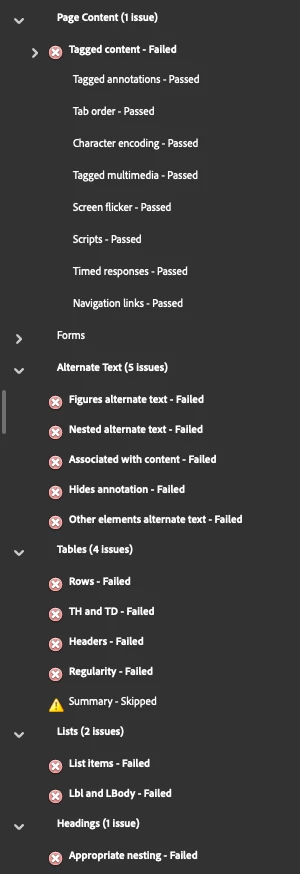
No longer ADA Compliant
  • Purchase Acrobat Studio because Acrobat AI Assistant can help solve this problem.

2:52: Case is closed


Summary:

  • Connected 10 times to Remote Support Session/Screen Share. At least 5 of them didn’t work because I’m on a Mac and so Adobe couldn’t see my screen. 
  • Spoke with 5 representatives (at least.)
  • Spent a total of 2 hours 30 minutes on the phone. 
  • Shared my InDesign and Acrobat files with Adobe. 
  • Given multiple “solutions” that make things worse.

Conclusion:

  • Read Aloud isn’t perfect.
    Correct answer Eugene Tyson

    I think the key issue here is that Acrobat Read Aloud and PDF accessibility are two different things.

    Read Aloud is a convenience feature and has never been considered a definitive test of PDF accessibility. If your tag structure, table headers, scope, and reading order are correct, then the more important test is how the document behaves in actual assistive technologies such as JAWS, NVDA, or VoiceOver.

    Several of the suggested fixes concern me. Re-running Automatically Tag PDF will rebuild the tag tree and can overwrite accessibility work coming from InDesign. Likewise, exporting to PostScript, re-distilling, or printing via Chrome can damage or completely remove accessibility information even if they happen to change the behaviour of Read Aloud.

    Based on your description, it sounds like Adobe support were trying to make Read Aloud behave a certain way rather than determining whether the PDF was actually failing accessibility requirements.

    Have you tested the document with a screen reader? If JAWS, NVDA, or VoiceOver read the table correctly, then I would be inclined to trust the accessibility structure rather than Acrobat's Read Aloud feature.
     

    3 replies

    Mike Witherell
    Community Expert
    Community Expert
    June 3, 2026

    Hi Rachel,

    Some thoughts for you:

    Adobe Acrobat is not very good at tagging for accessibility. Adobe Acrobat is not very good at reading out loud. The read-out-loud is not actually designed for strictly reading accessibility tags. In use, it often gets tired and frustrated. Simply restarting Acrobat Pro will often improve its read-out-loud, but it may or may not successfully follow the Tags panel.

    Auto-tagging will always destroy all your good tagging and throw out the baby with the bath water, so to speak. It will rebuild the whole document with its own tagging, which is usually faulty and will not pass its own accessibility checker mechanism.

    PostScript-and-Distill is a wrong answer. Just wrong.

    Purchasing Acrobat Studio will add nothing.

    Building in Illustrator is a completely wrong answer. 

    The problem isn’t getting all the text in one line.

    Open in Chrome and print the PDF to file is roughly the same as PS-and-Distill and will not help.

    You don’t really care about what the Read Order panel is doing. Just the Tags panel.

    Build in InDesign relying deeply on paragraph styles in your tables. Don’t forget the Articles panel before exporting a well-tagged PDF. Then fix just a few things manually in the Tags panel.

    Adobe Acrobat gets tired from using the Tags panel. So, save after every adjustment. Save-As to a new version filename every half hour. When Acrobat seems to struggle, restart Acrobat so that it can clear its limited mind and work fresh. Work on only a few pages at a time or even one problematic page at a time.

    One more thing: tables are anathema to accessibility. Can you re-design away from tables? Can you simplify your tables?

    Mike Witherell
    ali066khan
    Participant
    June 3, 2026

    I also completely agree  the solutions are strange. It’s clear that Read Aloud needs to be update 

    Eugene TysonCommunity ExpertCorrect answer
    Community Expert
    June 3, 2026

    I think the key issue here is that Acrobat Read Aloud and PDF accessibility are two different things.

    Read Aloud is a convenience feature and has never been considered a definitive test of PDF accessibility. If your tag structure, table headers, scope, and reading order are correct, then the more important test is how the document behaves in actual assistive technologies such as JAWS, NVDA, or VoiceOver.

    Several of the suggested fixes concern me. Re-running Automatically Tag PDF will rebuild the tag tree and can overwrite accessibility work coming from InDesign. Likewise, exporting to PostScript, re-distilling, or printing via Chrome can damage or completely remove accessibility information even if they happen to change the behaviour of Read Aloud.

    Based on your description, it sounds like Adobe support were trying to make Read Aloud behave a certain way rather than determining whether the PDF was actually failing accessibility requirements.

    Have you tested the document with a screen reader? If JAWS, NVDA, or VoiceOver read the table correctly, then I would be inclined to trust the accessibility structure rather than Acrobat's Read Aloud feature.
     

    rachel.l.courtney
    Participating Frequently
    June 3, 2026

    I completely agree - the solutions are strange. It’s clear that Read Aloud needs to be updated so that it works with the Accessibility features and is a feature that consistently works instead of a mediocre feature.

    Community Expert
    June 3, 2026

    You can put your case here

    https://indesign.uservoice.com/