Participant
September 16, 2019
Answered

How Do I Get Rid Of Underlines?

  • September 16, 2019
  • 6 replies
  • 11826 views

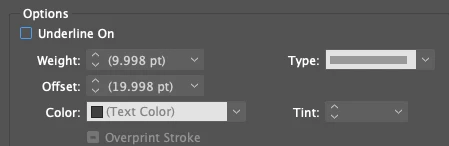
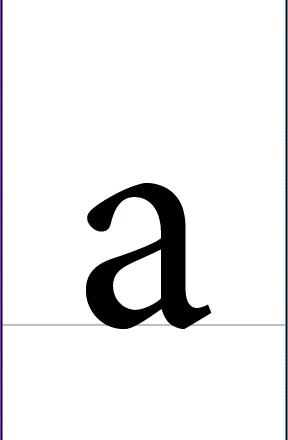
Everything I type into a text box has this underline below it. How do I get rid of it? I have 'underline on' unchecked but it's still there. 
  

    This topic has been closed for replies.
    Correct answer Willi Adelberger

    This rule can be made wth different options:

    1. Paragraph Rules above and below, fix it in Paragraph Styles.
    2. Underline, Strikethrough, fix it in Paragraph & Character Styles.
    3. Paragraph Frames: fix it in Paragraph Styles.

    6 replies

    Willi Adelberger
    Community Expert
    Willi AdelbergerCommunity ExpertCorrect answer
    Community Expert
    May 30, 2024

    This rule can be made wth different options:

    1. Paragraph Rules above and below, fix it in Paragraph Styles.
    2. Underline, Strikethrough, fix it in Paragraph & Character Styles.
    3. Paragraph Frames: fix it in Paragraph Styles.
    Participating Frequently
    May 30, 2024

    I had this with files we got from a company we market for, with their catalogs. The text boxes have underlining set with the actual text box widths. I had to hunt and found Paragraph Rules in the Paragraphs palette. No other way to get to it. Check that.

    Willi Adelberger
    Community Expert
    Community Expert
    May 30, 2024

    Look also in Rules above, as you can make it also this way.

    Community Expert
    September 17, 2019

    What happens when you change the screen mode to Preview? If the line disappears, then it is not an underline but a grid ruling.

    Choose View>Grids & Guides>Hide Baseline Grid to turn these off. 

    To make sure that text frames don't have a custom baseline grid by default, with no frame selected, choose Object>Text Frame Options>Baseline Options and deselect Use Custom Baseline Grid.

    JonathanArias
    Legend
    September 17, 2019

    You may have a paragraph style set as the default.

    Barb Binder
    Community Expert
    Community Expert
    September 16, 2019

    Hi Lyn:


    When all new text uses a specific format, like underline, that normally means it was inadvertantly enabled as a new default. Choose Edit > Deselect All, then uncheck Underline in the Control Panel (or Properties Panel or Character Panel).  Try adding new text. Is it off now? 


    Edit: that line is gray so it would need to be a custom underline. If this doesn't take care of it, check the paragraph style for Rule Below Paragraph. Maybe that is on a default instead.


    ~Barb


    ~Barb at Rocky Mountain Training
    Participating Frequently
    September 16, 2019

    Did You Check, if a character style is used?