
sarah89
Participant
July 10, 2017
Answered

How do I get the dropdown window in my control panel to change a font?

  • July 10, 2017
  • 3 replies
  • 691 views

I just updated indesign cc today and now when I try to change a font the only way that I can access my fonts is by clicking on "type" then "font".

There used to be a drop down bar to change the font in the controls bar at the top of the page when I was using the type tool. I'm sure there is a simple solution but I just can't figure it out. Please help, thank you!
    This topic has been closed for replies.
    Correct answer Barb Binder

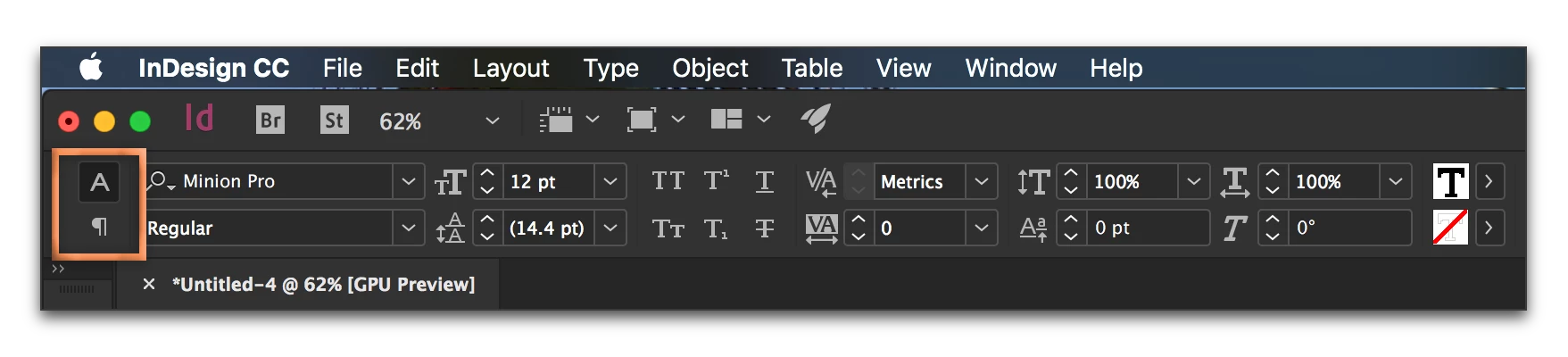
    Remember that when you have the Type tool selected, there are two views of the Control panel: Character and Paragraph. Be sure that you click the A and not the to see the font list. (If the whole Control panel is missing, choose Window > Control to show it.)

    3 replies

    Barb Binder
    Community Expert
    Barb BinderCommunity ExpertCorrect answer
    Community Expert
    July 11, 2017

    Remember that when you have the Type tool selected, there are two views of the Control panel: Character and Paragraph. Be sure that you click the A and not the to see the font list. (If the whole Control panel is missing, choose Window > Control to show it.)

    ~Barb at Rocky Mountain Training
    sarah89
    sarah89Author
    Participant
    July 11, 2017

    wow. Thank you so much! I knew there had to be a simple solution lol

    Barb Binder
    Community Expert
    Community Expert
    July 11, 2017

    Always happy to help, Sarah.

    ~Barb

    ~Barb at Rocky Mountain Training
    amaarora
    Inspiring
    July 10, 2017

    Hi,

    From the problem statement it appears you are not able to see the fonts menu in the control strip(appears at the top of the window)

    You can change the font still using the menu in the character panel(again from type menu)

    or

    You can check if you have purposefully disabled the fonts menu by customizing the control strip.

    https://indesignsecrets.com/tip-week-customizing-control-panel.php

    or

    you can see if resetting worksapce works for you.

    • Select Window > Workspace > Reset [Workspace Name].

    Workspace basics in InDesign

    And

    if none of the above work then you can reset your cache and preferences.

    Troubleshooting 101: Replace, or "trash" your InDesign preferences

    -Aman

    JonathanArias
    Legend
    July 10, 2017

    can you select your text tool, created a textbox and take a screenshot so we can see what you see?