Hi @m1b
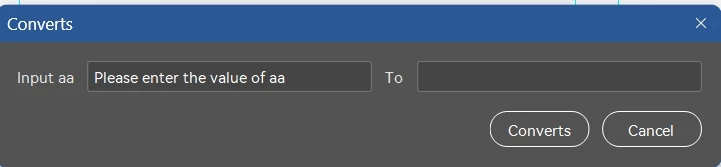
In this case, you first need to enter the value of aa on the left side.
When you tap the convert button, a function is executed.
Then the result is displayed on the right.
The variables are cross-referenced and I don't know how to get it to work.
var aa, bb, cc;
function aToc() {
    //Suppose here is an execution that ends up with cc
    bb = aa + "dfdf";
    cc = bb + 999
}
(function () {
    var yourName;
    // Create a new window
    var win = new Window("dialog", "Nmae");
    var inputGroup = win.add("group");
    inputGroup.add("statictext", undefined, "Input aa");

    var aaNameField = inputGroup.add("edittext", undefined, "Please enter the value of aa");
    aaNameField.characters = 20;
    inputGroup.add("statictext", undefined, "To");


    var yourNameField = inputGroup.add("edittext", undefined, cc);
    yourNameField.characters = 20;

    // Buttons group
    var btnGroup = win.add("group");
    btnGroup.alignment = "right";

    var okBtn = btnGroup.add("button", undefined, "Converts");   // OK
    var cancelBtn = btnGroup.add("button", undefined, "Cancel"); // Cancel

    // Button click events
    okBtn.onClick = function () {
        yourName = yourNameField.text; // Get the input value
        //rwJSON();
        win.close(1);
    };

    cancelBtn.onClick = function () {
        win.close(2);
    };

    // Show the dialog
    win.center();
    win.show();
    alert(yourName ? "Your name is: " + yourName : "You didn't enter a name.");
})();
@dublove it can be like this:
(function () {

    var yourName;
    // Create a new window
    var win = new Window("dialog", "Nmae");
    var inputGroup = win.add("group");
    inputGroup.add("statictext", undefined, "Input aa");

    var aaNameField = inputGroup.add("edittext", undefined, "Please enter the value of aa");
    aaNameField.characters = 20;

    var bbText = win.add("statictext", undefined, 'BB will be shown here.');

    // Buttons group
    var btnGroup = win.add("group");
    btnGroup.alignment = "right";

    var okBtn = btnGroup.add("button", undefined, "Converts");   // OK
    var cancelBtn = btnGroup.add("button", undefined, "Cancel"); // Cancel

    // Button click events
    okBtn.onClick = function () {
        yourName = aToc(aaNameField.text); // Get the input value
        //rwJSON();
        win.close(1);
    };

    cancelBtn.onClick = function () {
        win.close(2);
    };

    aaNameField.onChanging = function () {
        bbText.text = aToc(aaNameField.text);
    };

    // Show the dialog
    win.center();
    win.show();
    alert(yourName ? "Your name is: " + yourName : "You didn't enter a name.");
})();

function aToc(str) {
    //Suppose here is an execution that ends up with cc
    var bb = str + "dfdf";
    return bb;
};
or can be like this:
(function () {

    var aa;
    var yourName;

    // Create a new window
    var win = new Window("dialog", "Nmae");
    var inputGroup = win.add("group");
    inputGroup.add("statictext", undefined, "Input aa");

    var aaNameField = inputGroup.add("edittext", undefined, "Please enter the value of aa");
    aaNameField.characters = 20;

    inputGroup.add("statictext", undefined, "To");
    var yourNameField = inputGroup.add("edittext", undefined, aa);
    yourNameField.characters = 20;

    // Buttons group
    var btnGroup = win.add("group");
    btnGroup.alignment = "right";

    var okBtn = btnGroup.add("button", undefined, "Converts");   // OK
    var cancelBtn = btnGroup.add("button", undefined, "Cancel"); // Cancel

    // Button click events
    okBtn.onClick = function () {
        yourName = aToc(aaNameField.text);
        yourNameField.text = yourName;
        //rwJSON();
        // win.close(1);
    };

    cancelBtn.onClick = function () {
        win.close(2);
    };

    // Show the dialog
    win.center();
    win.show();
    alert(yourName ? "Your name is: " + yourName : "You didn't enter a name.");
})();

function aToc(str) {
    //Suppose here is an execution that ends up with cc
    var bb = str + "dfdf";
    return bb;
};




 AdChoices