

dublove
Legend
August 30, 2025
Question

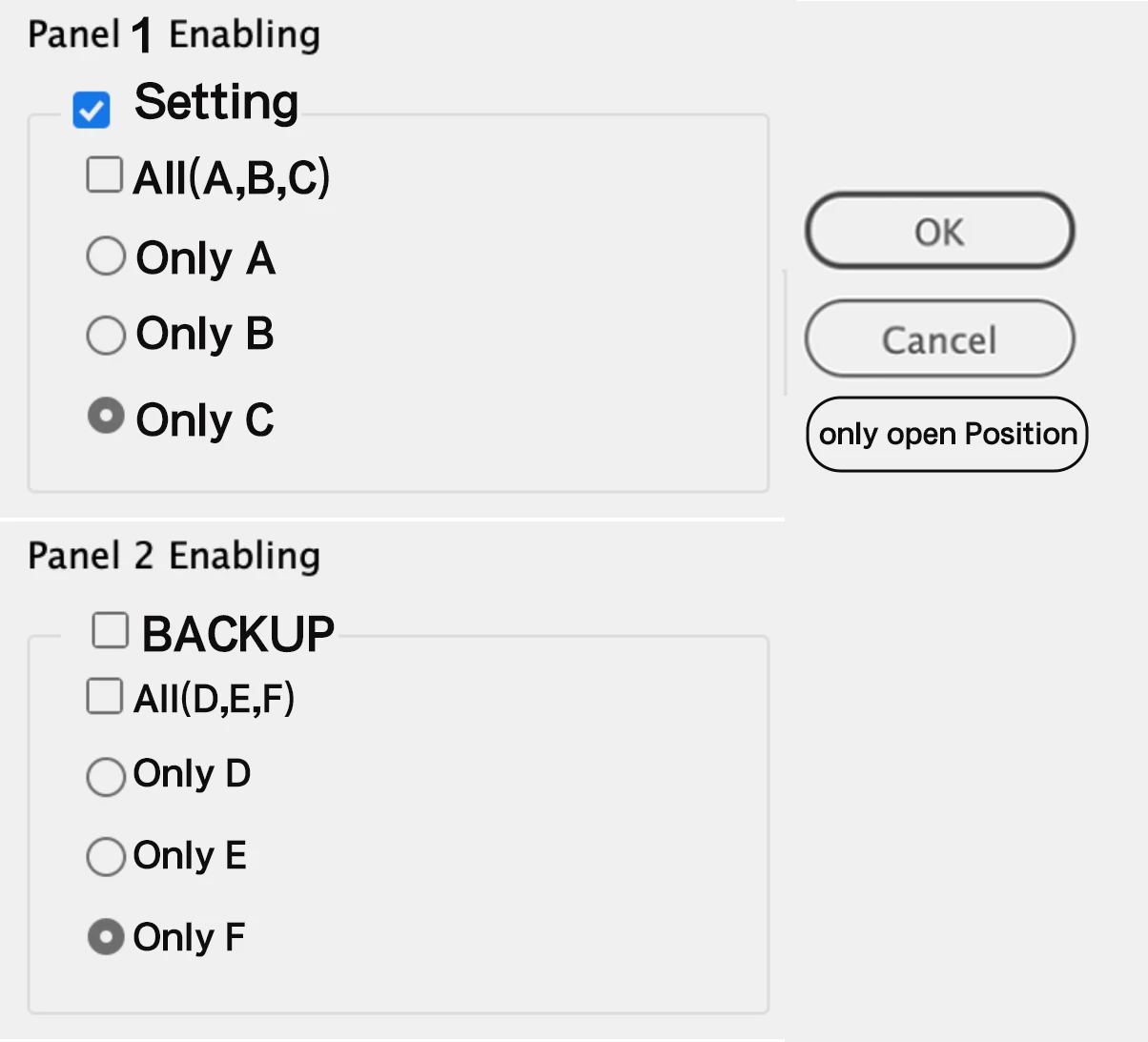
How do I implement this panel functionality?

  • August 30, 2025
  • 1 reply
  • 498 views

I came across this panel here. Later, I realized it was exactly the functionality I needed.
https://community.adobe.com/t5/indesign-discussions/how-to-convert-units-within-a-dialog-window/m-p/14151789#M545441

I've been tinkering with it for a while but haven't gotten it to work.


When I select “Setting,” it executes the function below it. If “All (A, B, C)” is checked, it sequentially executes the three functions A, B, and C. Otherwise, it executes only one function.

When selecting “only open position,” it only opens the selected path.

Thanks.

//Open the path, such as the shortcut location:
//Base path, Local path
var bPath = app.scriptPreferences.scriptsFolder.parent.parent;
var zh_CN = bPath.fsName;
var localShortcut = zh_CN + "\\" + "InDesign Shortcut Sets" + "\\";

function ABC() {
onlyA();
onlyB();
onlyC();
}
function DEF() {
    onlyD();
    onlyE();
    onlyF();
}
function onlyA() {
   var doSomething;
}
function onlyB() {
    var doSomething;
}
function onlyC() {
    var doSomething;
}
function onlyD() {
    var doSomething;
}
function onlyE() {
    var doSomething;
}
function onlyF() {
    var doSomething;
}


1 reply

brian_p_dts
Community Expert
Community Expert
August 30, 2025

Again, post your updates to the code so that we can attempt to help you. 

dublove
dubloveAuthor
Legend
August 31, 2025

Something like this.
But I don't know how to establish logical relationships with functions A(); B(); C(); D(); E(); F();.

There's still one missing: the "Open only Path" option.


//result variables
var pdfDropdown, colorDropdown, foodDropdown, foodList, angleCombo, integerCombo, realCombo, percentCombo, measureCombo,
    enablePanel, ABC, OnlyA, OnlyB, OnlyC,
    realEdit, intEdit, percentEdit, measureEdit, angleEdit, textEditField, pageWidth, mu;

//check for a doc
if (app.documents.length > 0) {
    mu = app.scriptPreferences.measurementUnit;
    app.scriptPreferences.measurementUnit = MeasurementUnits.PIXELS;
    var doc = app.activeDocument;
    pageWidth = doc.documentPreferences.pageWidth
    makeDialog();

} else { alert("Please open a document and try again.") }

/**
* Make the  dialog 
* @ return void
*/

function makeDialog() {
    var GrepEditorName = 'A GREP editor  Peter Kahrel';
    //the dialog name
    var theDialog = app.dialogs.add({ name: "Initial Settings", canCancel: true });
    with (theDialog) {
        with (dialogColumns.add()) {

            //Panel 2 Enabling
            with (dialogRows.add()) {
                guideColor = [20, 0, 150];
                staticTexts.add({ staticLabel: "Select your operation", staticAlignment: StaticAlignmentOptions.LEFT_ALIGN, minWidth: 150 });
            }
            enablePanel = enablingGroups.add({ staticLabel: " Initialization", checkedState: false, minWidth: 150 })
            with (enablePanel) {
                with (dialogColumns.add()) {
                    staticTexts.add({ staticLabel: "ABC" });
                    staticTexts.add({ staticLabel: "Only A" });
                    staticTexts.add({ staticLabel: "Only B" });
                    staticTexts.add({ staticLabel: "Only C" });
                }
                with (dialogColumns.add()) {
                    ABC = checkboxControls.add({ checkedState: false, minWidth: 150 });
                    with (radiobuttonGroups.add()) {
                        OnlyA = radiobuttonControls.add({ checkedState: true });
                        OnlyB = radiobuttonControls.add({ checkedState: false });
                        OnlyC = radiobuttonControls.add({ checkedState: false });
                    }
                }
            }
        }
    }

    //the dialog results
    var res = theDialog.show();
    if (res == true) {

        enablePanel = enablePanel.checkedState
        ABC = ABC.checkedState;
        OnlyA = OnlyA.checkedState
        OnlyB = OnlyB.checkedState
        OnlyC = OnlyC.checkedState


        main()
    } else {
        theDialog.destroy();
    }
}


function main() {
    app.scriptPreferences.measurementUnit = mu;

}


brian_p_dts
Community Expert
Community Expert
August 31, 2025

You posted a screenshot in the original photo of a dialog with settings checkmark and A B C D. This snippet has none of that. Give us actual code of what you are trying to achieve that will execute for us, and we can point to the issues. We're not writing your code for you for free. You say you've tried something but we don't see it here. Where are functions A B C. Etc. Where are they being referenced in the dialog box. Do the work and learn.