
b86310040
Participating Frequently
July 28, 2023
Answered

How do I maintain the knockout text in my tables when exporting to epub from InDesign?

  • July 28, 2023
  • 2 replies
  • 777 views

Needing some assistance. How do I maintain the knockout text in my tables when exporting to epub from InDesign?

When I export to epub from InDesign — the header row in my table (which is black with knockout white text in InDesign table) defaults to gray text with white fill. My tables are not rasterized containers because book contains too many tables to render that way. Size restrictions. Any help is appreciated. Thank You.
This topic has been closed for replies.
Correct answer James Gifford—NitroPress

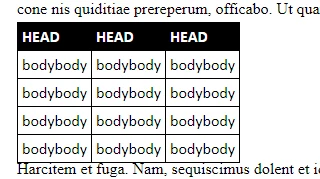
From Calibre Reader:


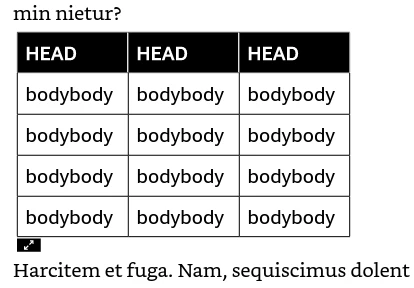
And from Kindle Previewer (not everything works in both EPUB and Kindle); note that Kindle added in the white vertical separators, which aren't set in my ID layout:


All I can say is set Table, Cell and Paragraph Styles for all elements. 🙂

2 replies

Mike Witherell
Community Expert
Community Expert
July 28, 2023

Do you have an RGB white swatch defined?

Mike Witherell
b86310040
b86310040Author
Participating Frequently
July 28, 2023

Hi. It is cmyk for all my colors. = ]

James Gifford—NitroPress
Legend
July 28, 2023

I'd have to experiment with this specific combination of elements, but it probably comes down to the annoying gulf between the way ID does (and exports) some things and the way CSS/EPUB does those things. The sme effect or layout can be done at both ends, but not in a straight export.


That said, I can't bring to mind any problems exporting reversed text in text frames or table cells, so it might just be a glitch in your styles. Let me tinker for a bit.

James Gifford—NitroPress
Legend
July 28, 2023

From Calibre Reader:


And from Kindle Previewer (not everything works in both EPUB and Kindle); note that Kindle added in the white vertical separators, which aren't set in my ID layout:


All I can say is set Table, Cell and Paragraph Styles for all elements. 🙂

b86310040
b86310040Author
Participating Frequently
July 28, 2023

Thanks so much for the response this is my first ebook with tables. I am familiar with setting the paragraph styles could you expand on setting the table and cell ones, please.

= ]