
Participant
August 19, 2009
Question

How do I make a custom shaped box?

  • August 19, 2009
  • 4 replies
  • 39399 views

Hello,

I am using CS4 on the PC. And I need to create a custom shaped box using the 'Rectangle Frame Tool' and the 'Type Tool'

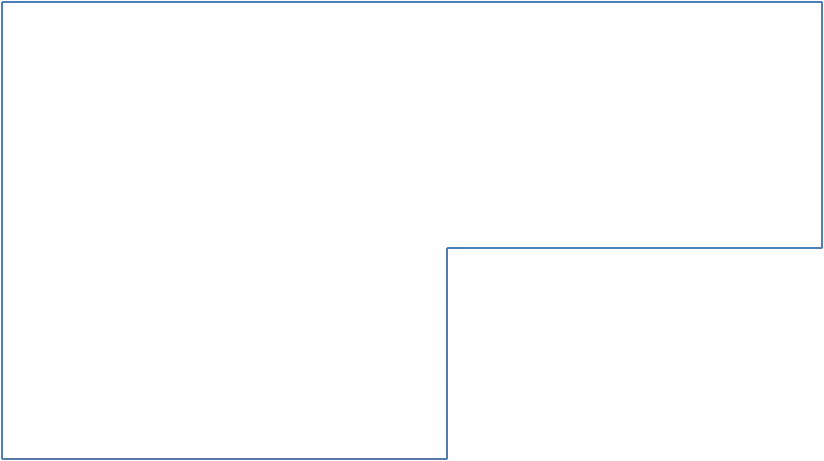
The shape I need to make is a large rectangle with the bottom right hand corner removed and then the corners of the shape having a 'Rounded rectangle' finish to it.

An idea of the shape I need to create but without the rounded rectangle effect on it is below.

Thanks for your time, and (hopefully) help. Much appreciated
    This topic has been closed for replies.

    4 replies

    Participant
    August 19, 2009

    In addition to the other suggestions, you could also use the bezier tool (the one that looks like a fountain pen). Once you've created the shape you want simply use select the shape and then "place" whatever image you want in the shape. All the autofit features will still work with the shape. Good luck.

    Peter Spier
    Community Expert
    Community Expert
    August 19, 2009

    Another option is to use the pen tool to add two poiints where you want the cutout to start, then use the direct select tool to select the bottom corner point and dratg it inward.

    However you decide to creat the shape, Object > Corner Options... will allow you to round the corners. If you want all the corners rounded, do it after pathfinder operations. If you want to knock a square chunk out of a rounded corner frame, do the corners first.

    August 19, 2009

    Either use the Pathfinder tools to unite two rectangles, or just draw your custom rectangle with the pen tool.

    Petteri_Paananen
    Inspiring
    August 19, 2009

    You should check out a tool called Pathfinder (panel:Window>Object&Layout>Pathfinder or direct commands: Object>Patfinder)

    With it you can add or substract different shapes... very usefull for everyone who wants to create new shapes in Indesign...