K.Wissem
Participant
September 9, 2026
Answered

How do i make overtext appear as 3 dots (or an ellipsis) ?

  • September 9, 2026
  • 7 replies
  • 43 views

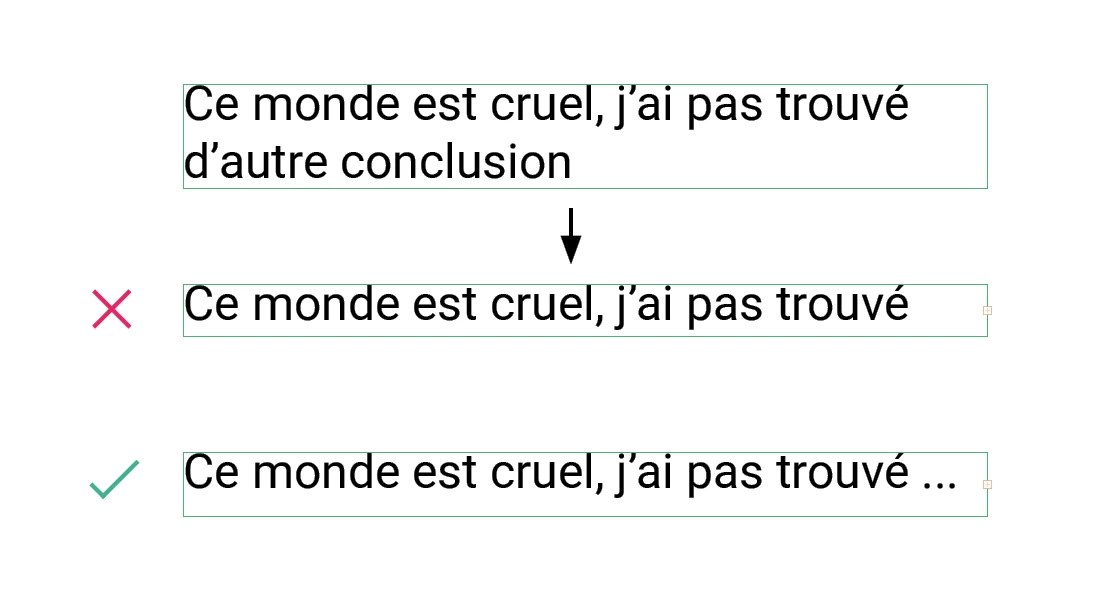
Hello, Im looking to make a script to facilitate a mockup I'm doing, and usually i resize boxes automatically to fit the text or description, but for this one i need it to be one line only and make the overtext appears as "...”.


I’ve tried looking for a solution but haven't found any so i came here. I tried tabulation but it just goes to the next line if the text reach the 3 dots, and ive tried looking at all the paragraph parameters too but i can’t find anything helpful (or i missed it).Maybe with a grep replacement ?
Thanks in advice for anyone answering !

Correct answer rob day

Then you could also replace the lines after line 1 with an ellipsis character (which would not break). Something like this sets the document’s first text frame:


//doc’s first text frame
var f = app.activeDocument.textFrames[0]
var l = f.lines
var b = f.geometricBounds

//remove all the textframe’s lines after line 1
for (var i = 1; i < l.length; i++){
l[i].remove()
};

//add an ellipsis character at the end of the line and set the text frame bounds
l[0].insertionPoints[l[0].insertionPoints.length-2].contents = SpecialCharacters.ELLIPSIS_CHARACTER
f.geometricBounds = [b[0], b[1], l[0].baseline, b[3]]


Before and after:


7 replies

Community Expert
September 9, 2026

I test this on the test document I sent 

Seems to work for me. 


// Delete Overset Text and Append Ellipses (...)
if (app.documents.length > 0) {
var doc = app.activeDocument;
var stories = doc.stories;
var count = 0;

for (var i = 0; i < stories.length; i++) {
var story = stories[i];

if (story.overflows) {
try {
var lastContainer = story.textContainers[story.textContainers.length - 1];
var lastVisibleCharIndex = lastContainer.insertionPoints[-1].index;
var totalChars = story.insertionPoints[-1].index;

// 1. Remove the hidden overset text
if (totalChars > lastVisibleCharIndex) {
story.insertionPoints.itemByRange(lastVisibleCharIndex, totalChars).remove();

// 2. Add the three dots to the new end of the text
var lastParagraph = story.paragraphs[-1];

// Handle trailing break characters (like returns or enters) so dots go before them
if (lastParagraph.characters.length > 0) {
var lastCharContents = lastParagraph.characters[-1].contents;
// Checking for SpecialCharacters.NEW_LINE, paragraph breaks, etc.
if (lastCharContents == "\r" || lastCharContents == "\n" || lastCharContents == String.fromCharCode(3)) {
lastParagraph.insertionPoints[-2].contents = "...";
} else {
lastParagraph.insertionPoints[-1].contents = "...";
}
} else {
story.insertionPoints[-1].contents = "...";
}

count++;
}
} catch (error) {
// Fail-safe method
try {
var lastFrame = story.textContainers[story.textContainers.length - 1];
var storyLength = story.characters.length;

story.characters.itemByRange(lastFrame.characters[-1].index + 1, storyLength - 1).remove();
story.paragraphs[-1].insertionPoints[-1].contents = "...";
count++;
} catch (innerError) {
continue;
}
}
}
}
alert("Success! Truncated and added dots to " + count + " overset stories.");
} else {
alert("Please open an InDesign document first.");
}


rob day
Community Expert
Community Expert
September 9, 2026

Hi ​@K.Wissem , Just to clarify, do you want to keep the overset text, or could it be deleted and replaced with an ellipsis character?

K.Wissem
K.WissemAuthor
Participant
September 9, 2026

Hello Rob It could be deleted and replaced, it's to make previews for visuals so i don’t have to keep all the data of the text in it.

rob day
Community Expert
rob dayCommunity ExpertCorrect answer
Community Expert
September 9, 2026

Then you could also replace the lines after line 1 with an ellipsis character (which would not break). Something like this sets the document’s first text frame:


//doc’s first text frame
var f = app.activeDocument.textFrames[0]
var l = f.lines
var b = f.geometricBounds

//remove all the textframe’s lines after line 1
for (var i = 1; i < l.length; i++){
l[i].remove()
};

//add an ellipsis character at the end of the line and set the text frame bounds
l[0].insertionPoints[l[0].insertionPoints.length-2].contents = SpecialCharacters.ELLIPSIS_CHARACTER
f.geometricBounds = [b[0], b[1], l[0].baseline, b[3]]


Before and after:


K.Wissem
K.WissemAuthor
Participant
September 9, 2026

(missplaced the initial response)

Community Expert
September 9, 2026


You could add a text frame with 3 dots. And anchor it to the start of the line. That is it’s starting position. Then in the Anchor settings you could set it up Custom to always be on the right and positioned in line with the text. 

Then when can ignore overset text warnings.
Then use ~a in the find grep to remove all anchored frames at the end. 

~a
replace with nothing

And it will remove all the anchored frames.  


It’s not perfect but could be workable

Make the object style and apply it to the first instance and make it an object style and apply the object style to the 3 dots.


You can then use Find Change to add the anchor to the frames - something like 
~C is the object on the clipboard - so you can copy your first correct instance and place that.


My test result is like this


YOu can make the line longer


I’ve attached a sample IDML 


K.Wissem
K.WissemAuthor
Participant
September 9, 2026

Thanks a lot ! I’m tweaking it a bit to fit to my project but it’s working nicely so far, thank you for taking the time to even make the InDesign exemple 🙏