Inspiring
December 21, 2025
Answered

How do I rename a parent page?

  • December 21, 2025
  • 5 replies
  • 452 views

I searched this forum and did not find a solution. Is there a way to rename existing parent pages in InDe 2026? Thanks.

Correct answer rob day

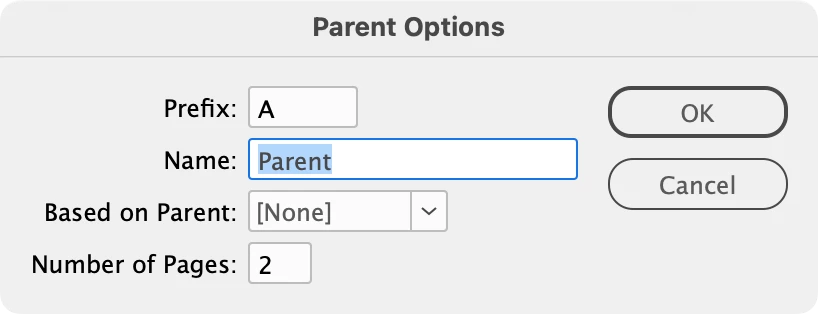
Hi @dunazee ,  You should be able to select the parent pages in the Pages panel, choose Parent Options for "A-MasterName" and get a change dialog—does that not work for you?:


871050iB0CA4D2AADBF2F8A.png

5 replies

rob day
Community Expert
rob dayCommunity ExpertCorrect answer
Community Expert
December 21, 2025

Hi @dunazee ,  You should be able to select the parent pages in the Pages panel, choose Parent Options for "A-MasterName" and get a change dialog—does that not work for you?:


871050iB0CA4D2AADBF2F8A.png

dunazeeAuthor
Inspiring
December 21, 2025

OMG, I did NOT even see that, DUH!! THANK YOU SO MUCH! I might have to take this one down, I'm feeling that stupid. 

rob day
Community Expert
Community Expert
December 21, 2025

I might have to take this one down


No need to do that, it’s kind of buried in the panel flyout...