
Participant
November 20, 2013
Question

How do I set additional Preflight options...

  • November 20, 2013
  • 1 reply
  • 831 views

Hi Folks,

I'm attempting to write an AppleScript to create a Preflight profile in InDesign CS5.

I've worked out how to create the profile, give it a name, and set some of the properties using code similar to this shown below:

tell application "Adobe InDesign CS5"

          set profileName to "TEST PROFILE"

          set profileDescription to "This text describes what the profile does..."

          set newProfile to make new preflight profile with properties {name:profileName}

          set description of newProfile to profileDescription

          tell newProfile 

                    set TrnspBlendOptions to make preflight rule instance with properties {id:"ADBE_TransparencyBlending"}

                    set flag of TrnspBlendOptions to return as error

          end tell

end tell

This code above will configure the settings as shown in the screenshot below:
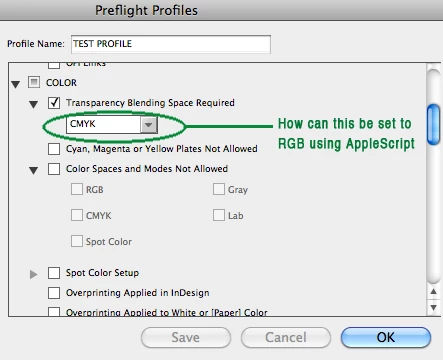
My question is...

How do I access and set additional properties?

In this instance how do I set the colorspace to be RGB ?

Cheers, Rob.

This topic has been closed for replies.

1 reply

Jongware
Community Expert
Community Expert
November 20, 2013

Check the manual: "ADOBE INDESIGN CS6: SCRIPTING GUIDE: APPLESCRIPT"

p. 169:

One of the hardest aspects of scripting rules is discovering rule names and properties. Due to the dynamic

nature of rules (they really are just strings), specific rule names and properties do not appear in the Extend

Script Tool Kit’s Object Model Viewer. To discover this information, see “Exploring Preflight Profiles” on

page 163.

.. and in the table that follows, you will find

ADBE_TransparencyBlending “ADBE_TransparencyBlending” on page 175

so on p. 175 you'd find this table:

Data Type Name Default value

Integer space 3

There is no list of values given, so presumably, the easiest thing is to set the blending using the Preflight panel to the item you want, check what value it is, and copy that value in your script for future use.

-RobC-Author
Participant
November 20, 2013

Thanks for pointing me in the right direction Jongware - it's much appreciated.

I concluded that setting the 'data value' of 'rule data object 1' to 2 (for RGB) or 3 (for CMYK) it works succesfully.

Example as follows (albeit rather verbose):

     tell application "Adobe InDesign CS5"

         set profileRef to object reference of preflight profiles whose name is equal to "ROBS TEST PROFILE"

         set profileRule to object reference of preflight profile rules of profileRef whose id = "ADBE_TransparencyBlending"

         set flag of profileRule to return as warning

         set data value of rule data object 1 of profileRule to 3 (* RGB = 2, CMYK = 3 *)

     end tell

I just now need to work out an elegant solution to handle all other properties.

Cheers, Rob